Automated Lead Generation: A Practical Guide for 2026
Master automated lead generation with proven workflows for sourcing, enrichment, and verification. Learn how modern teams scale outreach
Your team starts Monday with a familiar task. Someone copies business names from map results, someone else pastes phone numbers into a spreadsheet, and an SDR spends the afternoon checking whether old email addresses still work. By the time the list reaches the CRM, duplicates, missing fields, and stale contacts have already entered the process.
Automated lead generation solves more than a speed problem. It connects sourcing, enrichment, verification, filtering, and export so the same rules run every time. That consistency matters because automation can amplify clean data efficiently, but it can also distribute bad data faster than a manual team ever could.
Why Manual Prospecting No Longer Scales
Manual prospecting usually fails in small ways before it fails visibly. A rep copies a company name with a slightly different spelling, misses a second location, pastes a phone number into the wrong column, or saves a contact without recording when the information was checked. One error doesn't look serious. Repeated across a growing list, those errors create duplicate outreach, weak personalization, and unnecessary sales work.
The daily workflow becomes fragmented. One person searches maps, another checks websites, a third looks for contact details, and sales operations tries to reconcile the files before import. No one owns the complete chain, so nobody can easily answer basic questions: Which source produced the record? When was the email verified? Was this business already contacted? Why did this lead receive its current score?
A connected workflow changes the unit of work from an individual record to a controlled pipeline. Search criteria identify potential businesses, enrichment adds missing firmographic and contact details, verification checks reachability, and export prepares stable fields for the CRM. Human judgment still belongs in targeting, exceptions, and messaging. It shouldn't be spent copying the same fields between browser tabs.
What changes after automation
A practical automated lead-generation system should handle the repetitive path without requiring a person to approve every row:
- Source: Search defined categories, locations, and business attributes across relevant public directories.
- Normalize: Convert different source formats into consistent names, addresses, categories, phone fields, and URLs.
- Enrich: Add available emails, social profiles, websites, and other useful context.
- Verify: Check contactability before a record reaches outreach or sales routing.
- Export: Send clean CSV, Excel, JSON, or CRM-ready data to the next system.
Teams also need attribution. A list isn't useful if you can't connect it to outcomes, campaigns, and sales activity. A practical SaaS lead generation tracking framework helps teams preserve that connection instead of treating extracted contacts as disconnected spreadsheet rows.
Operational rule: Automate the handoffs first. Automating a poorly defined prospecting process only makes its mistakes harder to see.
For sales teams, the workflow should live close to the existing operating rhythm, including ownership, routing, follow-up status, and suppression rules. A focused sales-team use case for automated business lead extraction shows how map-based research can fit into that broader process without making reps manage another isolated database.
The Three Pillars of Automated Lead Generation
Think of automated lead generation as a manufacturing line. Sourcing is the raw-material station, enrichment adds usable components, and verification is quality control. If the first station misses a large part of the market, later stages can't recover it. If enrichment adds guessed or stale details, verification has to reject them before they reach sales.
Sourcing determines market coverage
Sourcing identifies businesses that match the search definition. That definition should be specific enough to support downstream qualification, including category, geography, location type, and any visible business attributes that matter to the campaign.
A single directory gives you a convenient starting point, not a complete market view. Different platforms can list different businesses, use different categories, or display different contact fields. A multi-source workflow broadens discovery, then uses normalization and deduplication to produce one usable record per business.
Enrichment makes records actionable
A business name and address can support market research, but outreach usually needs more. Enrichment can add websites, emails, phone numbers, social profiles, review information, and structured location data.
The important distinction is between adding a field and adding a trusted field. An enrichment provider may return a value, but your pipeline still needs to know whether that value was verified, when it was checked, and which source supplied it. Missing CRM fields can reduce scoring accuracy, so enrichment should support the qualification model rather than create decorative data.
Verification protects the downstream workflow
Verification should happen after sourcing and after each enrichment pass. If one provider supplies an email and another supplies a phone number, the pipeline should validate both rather than assume that a record becomes more reliable just because it contains more fields.
The benchmark guidance is concrete: acceptable email accuracy sits around 90% to 95%, while fast-changing fields such as job titles may need refresh cycles of 30 to 60 days. Reliable lead scoring also requires sufficient outcome history, including 12 or more months of conversion history and at least 100 closed-won deals, according to the industry guidance on AI lead-generation tool practices.
Verification principle: Enrichment increases possibility. Verification determines whether the record is safe to use.
Evaluate tools against all three pillars. A source with broad coverage but weak verification creates deliverability risk. A verifier with no reliable sourcing layer leaves the team with a clean but incomplete market. The strongest architecture treats the pillars as one pipeline, with a clear status and audit trail at every transition.
Sourcing at Scale with Multi-Source Extraction
The sourcing layer sets the ceiling for your market coverage. If the workflow searches only one map index, it may miss businesses that appear elsewhere, inherit inconsistent category labels, or provide fewer contact fields than another source. Adding Google Maps, Apple Maps, and Bing Maps creates a broader discovery process, provided the pipeline merges records rather than exporting three overlapping lists.
A useful source architecture separates collection from interpretation. Each platform can return its native listing data, while a normalization step maps fields into a common schema. That schema should preserve the source URL and source name, then standardize core fields such as business name, category, address, coordinates, website, phone, rating, review count, and claimed status.
Why managed extraction matters
API-based sourcing can impose per-search ceilings or require separate logic for each platform. Subscription-based cloud extraction can support concurrent jobs and maintain a consistent workflow across sources, reducing the need to rewrite scripts whenever an interface changes.
The trade-off isn't just technical convenience. It affects operating cost, reliability, and the amount of attention your team spends maintaining infrastructure. Growth teams comparing prospecting approaches may find this AI prospecting guide by Stimulead useful for thinking through workflow design beyond individual data providers.
For map-heavy campaigns, a comparison of Google Maps scraper options can help clarify differences in source coverage, export behavior, enrichment, and maintenance requirements.
Single-source versus multi-source coverage
The benchmark below uses the same 500-lead input and compares a single-source database with a 15-plus-provider waterfall. The figures describe verified contact coverage, not the total number of businesses discovered.
| Metric | Single-Source Database | Multi-Source Waterfall |
|---|---|---|
| Verified-email coverage | 70% to 80% | 98% |
| Phone coverage | 30% to 60% | 85% |
| Provider architecture | One source | 15-plus providers |
Source: 2026 B2B data-enrichment accuracy benchmark.
The benchmark illustrates why sequential enrichment can improve reachability, but it doesn't remove the need for controls. Deduplicate after every pass, preserve provenance, and reject values that fail validation. Otherwise, multiple providers can create inflated confidence around the same stale record.
A strong sourcing job also captures more than contact details. Ratings, review counts, claimed status, locations, categories, and source URLs can help segment businesses before enrichment credits are spent. That makes the workflow more selective and gives sales context for personalization without requiring a separate research project.
The Data Decay Problem That Automation Amplifies
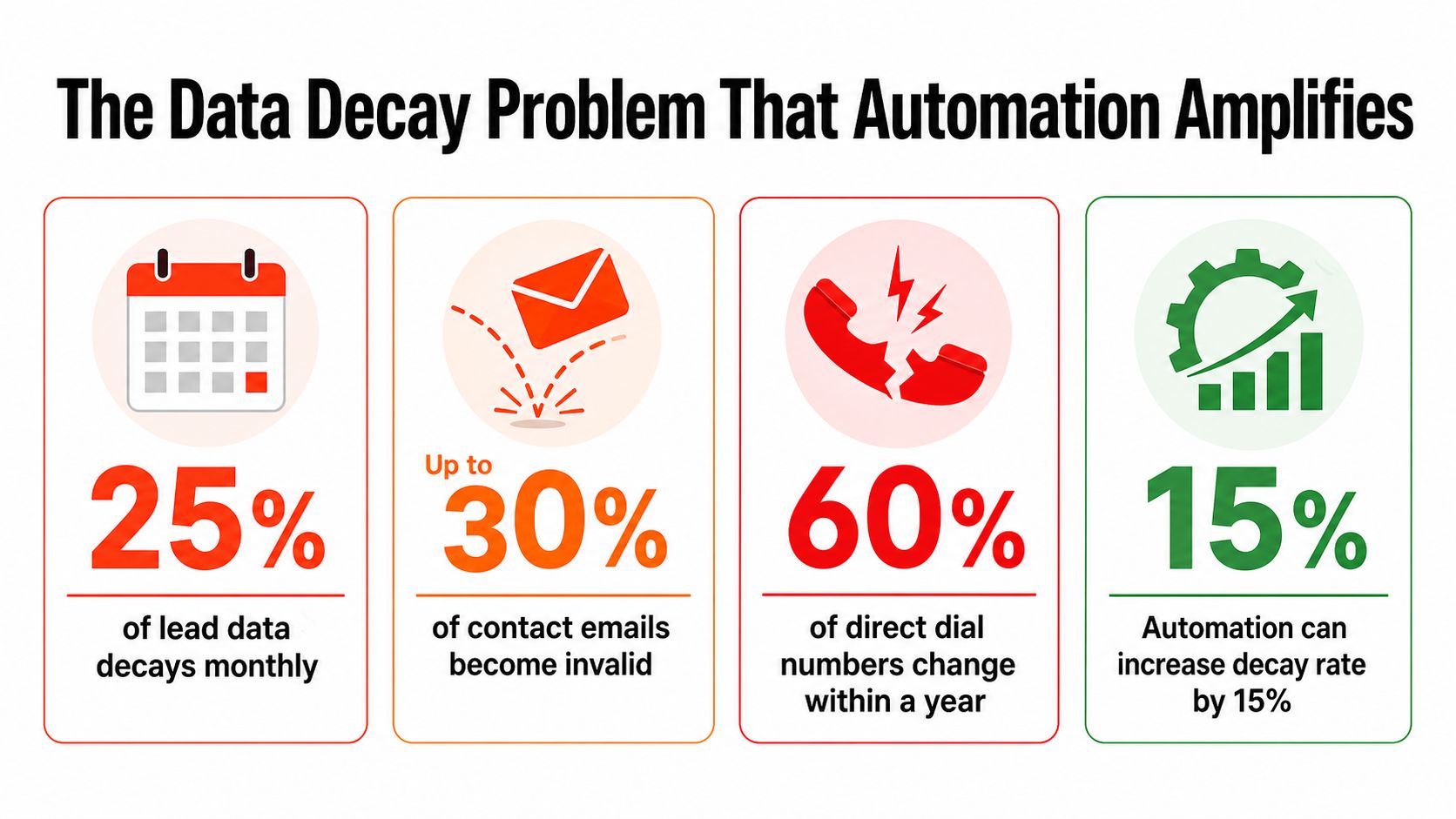
A lead pipeline can keep extracting records while losing its ability to reach real people. If verification capacity remains fixed as volume grows, automation sends more invalid addresses, creates failed handoffs, and makes dashboards look healthier than the funnel underneath.
Industry coverage places annual CRM contact-data decay at 34%, and reports that AI lead-scoring performance can fall by 28% against clean-data models when records are not maintained. Those figures make freshness a production requirement, not a one-time cleanup task. Store a timestamp for each important field, including email, title, phone number, and company information, so the team can judge whether it is current enough for the intended use.
Cold outreach exposes weak hygiene quickly. Independent benchmark pages place cold-email bounce rates around 7.5%, compared with 2% to 2.48% for standard B2B marketing lists, according to this B2B email marketing benchmark analysis. Higher sending capacity does not correct defective records. It distributes them faster.
Decide whether volume is earned
The useful scaling question is how many verified, deliverable, relevant contacts the team can safely process. A larger email list for sales outreach has little value if verification and suppression rules cannot keep pace.
Use a simple operating test:
- Measure verification throughput: Record how many entries the validation process checks before routing or outreach.
- Track rejection reasons: Separate invalid email, duplicate business, missing decision-maker, and unsuitable category.
- Watch deliverability: A growing list with rising bounces signals declining data quality.
- Audit conversion quality: Compare sales acceptance and downstream outcomes by source and extraction run.
- Refresh changing fields: Job titles and contact ownership require more frequent review than stable location data.
Email opens and clicks also need cautious interpretation. Privacy features and security scanners can inflate engagement metrics by about 31%, so those signals should not determine lead quality alone. A practical email validation resource for sales teams helps place validation before routing and outreach, rather than treating it as a post-campaign repair step.
Scaling rule: Do not increase extraction volume until verification, suppression, and review processes can absorb it without lowering list quality.
Discovery is often easy to automate. Keeping records contactable, attributable, and safe to use requires scheduled checks, clear rejection statuses, and ownership after records enter the system.
Building an End-to-End Extraction Pipeline
A reliable pipeline starts with a search definition, not a scraper. Specify the business categories, locations, source platforms, fields required by the CRM, and the conditions that make a record eligible for enrichment or outreach. If the search criteria are vague, automation will produce a larger version of an unclear audience.
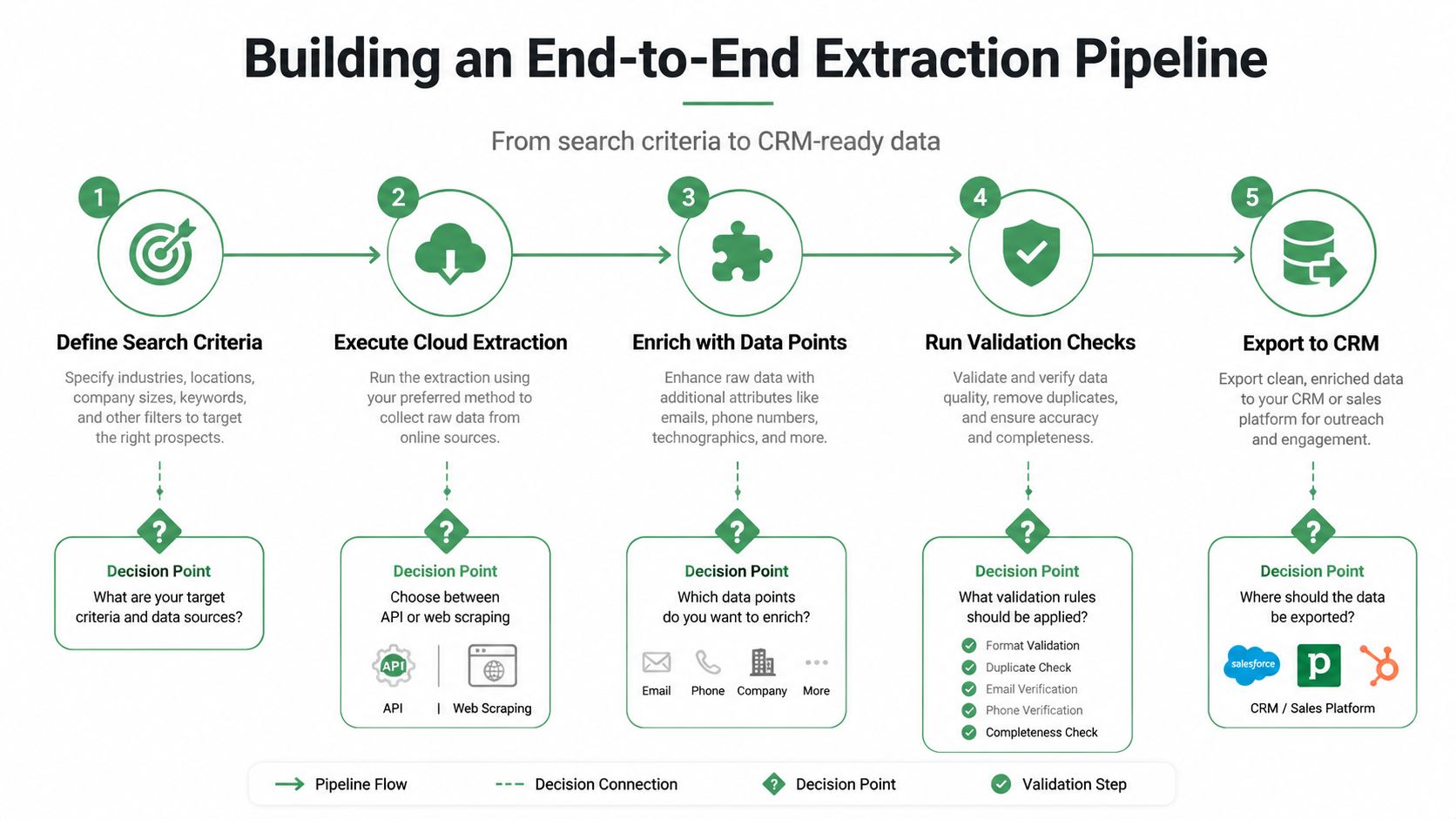
Build the workflow in five controlled stages
- Define search criteria. Choose categories, locations, and any listing attributes that support qualification. Keep the criteria reusable so scheduled runs remain comparable.
- Execute cloud extraction. Decide whether an API or managed extraction service fits the job. Record the source, search parameters, run time, and expected output.
- Enrich the records. Add emails, phones, websites, social profiles, and other fields only when they support a real sales or segmentation need. Extra fields increase complexity if nobody uses them.
- Run validation checks. Verify contactability, normalize formats, remove duplicates, and mark fields that need refresh. Failed checks should create explicit statuses, not silent blanks.
- Export to the CRM. Use stable columns and predictable data types. Test imports with a small batch before allowing a full run to update production records.
A managed service with credit reconciliation can also make costs easier to forecast. If a search fails or returns fewer records than expected, automatic refunds for the difference prevent teams from paying as though the full job completed. That accounting matters when multiple searches run concurrently and a failed job could otherwise disappear inside a monthly total.
Protect the handoff
Most pipeline failures appear at boundaries. One source labels a phone field differently, an enrichment provider returns a blank website, or a duplicate record passes because the business name differs slightly from the existing CRM value. Build explicit rules for canonical business name, domain, phone normalization, address matching, and source provenance.
Pre-export filters should answer operational questions:
- Is the business inside the target geography?
- Does it match the campaign category?
- Is there a usable website or contact method?
- Has the record already entered outreach?
- Are required CRM fields present?
- Is the verification timestamp within the allowed freshness window?
The MapLeads quickstart documentation is a practical reference for configuring an extraction workflow and preparing structured exports. Whatever platform you use, keep the first production run small, inspect rejected records, and compare the imported columns with the CRM schema before scheduling repeat jobs.
Managed Cloud Extraction Versus DIY Scraping
DIY scraping gives technical teams control. You can choose the runtime, store raw responses, write custom matching logic, and adapt the workflow to unusual requirements. That flexibility can make sense when the data model is highly specialized and the team is prepared to maintain proxy networks, CAPTCHA handling, browser behavior, monitoring, and schema changes.
The hidden cost appears after launch. A local script that works today may fail when a map interface changes. A proxy pool may produce inconsistent results. A CAPTCHA block can interrupt a scheduled job, while a small schema change can break a CRM import downstream. The software may be inexpensive, but engineering attention isn't free.
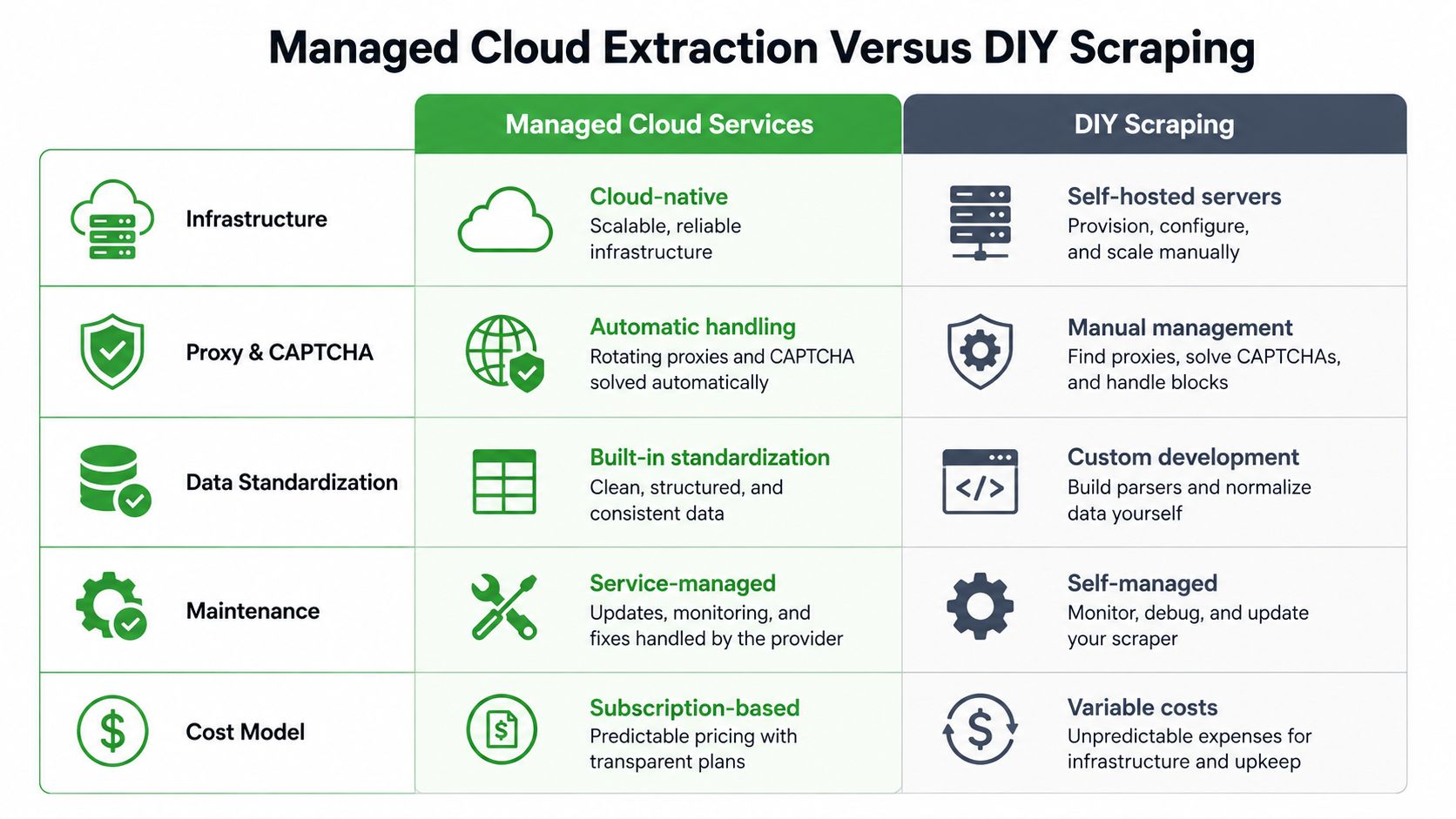
Compare the operating models
| Area | Managed Cloud Services | DIY Scraping |
|---|---|---|
| Infrastructure | Provider-managed cloud jobs | Team-managed servers or local runtime |
| Proxy and CAPTCHA handling | Usually handled within the service | Built and maintained by the team |
| Data standardization | Shared workflow and output schema | Custom transformations |
| Maintenance | Service-managed updates | Internal maintenance and debugging |
| Cost model | Subscription or usage model | Variable infrastructure and engineering cost |
Managed extraction is usually the better fit when sales or marketing operations needs repeatable jobs without assigning engineering time to browser maintenance. It also reduces retraining when the same search form and output columns work across Google Maps, Apple Maps, and Bing Maps.
DIY becomes more attractive when the team needs unusual logic, already operates scraping infrastructure, or can tolerate interruptions while maintaining the system. The decision should account for verification and CRM integration too. A scraper that collects records successfully but leaves enrichment, deduplication, and validation to separate manual steps hasn't solved the entire lead-generation problem.
A service such as MapLeads converts searches from Google Maps, Apple Maps, and Bing Maps into exportable lists, with enrichment for verified emails, phone numbers, websites, social profiles, reviews, and standardized metadata. Its managed workflow also includes cross-source merging, deduplication, pre-export filters, and CSV, Excel, and JSON exports, which are the controls teams should evaluate alongside raw extraction capacity.
For a broader comparison with other extraction approaches, review these Outscraper alternatives for map-data workflows. Choose the model that matches your team's technical capacity and the cost of maintaining reliability, not just the apparent price of the first successful run.
Governance and Compliance in Automated Outreach
Automation should be governed before it is scaled. Recent industry reporting says 71% of B2B buyers want explicit disclosure of AI-generated outreach, while 43% say undisclosed AI outreach harms brand consideration. Yet only 12% of firms piloting agentic AI outbound have governance specific to autonomous agents, according to the 2025 report on AI lead-generation risks and trends.
That gap creates a practical responsibility for revenue operations. Collect public business data, document the lawful basis and applicable outreach rules for each market, verify contactability before routing, and provide a clear suppression path. Keep refresh timestamps, source provenance, consent or communication status where relevant, and an owner for exceptions.
A governance checklist should include:
- Data boundaries: Collect only the public business information your workflow needs.
- Human review: Require review for sensitive segments, unusual records, and autonomous messaging decisions.
- Disclosure: Make AI involvement clear when the outreach experience calls for it.
- Suppression: Stop future contact immediately after an opt-out or do-not-contact request.
- Monitoring: Review bounce rates, complaints, rejected records, and source-level quality before expanding volume.
Fast outreach is useful only when buyers can trust the process behind it. Build the controls first, then increase automation inside those boundaries.
MapLeads turns searches across Google Maps, Apple Maps, and Bing Maps into structured lead lists, with enrichment, verification, deduplication, filtering, and CRM-ready exports. If your team needs to replace manual map research with a repeatable pipeline that treats data quality as a core operating control, visit MapLeads and configure your first extraction workflow.