Business Contact Database Guide: Build or Buy in 2026
Learn what a business contact database is, which fields matter, how to evaluate providers, and how to build one that actually drives outreach in 2026.
Business contact databases decay at roughly 2.1% every month, which compounds to about 22.5% a year according to Landbase. That's the part most buyers ignore when they shop for “more rows.” The question isn't how big the list looks on demo day, it's how much of it still works when your SDRs start dialing, emailing, and routing leads on Monday.
A business contact database is a pipeline, not a spreadsheet. If you treat it like a one-time purchase, you'll pay for stale titles, dead emails, duplicate companies, and broken CRM imports later. If you treat it like a maintained system, it can power outreach, routing, segmentation, and reporting without turning every campaign into cleanup work.
What a Business Contact Database Is
Data freshness is the point. Independent industry research says business contact data decays at roughly 2.1% per month, which compounds to about 22.5% annually from Landbase. Landbase also reports that poor data quality costs organizations an average of $12.9 million per year. That is why I stop teams when they start treating record volume like the main asset.
A business contact database is a structured, queryable, continuously maintained set of business and contact records. In plain English, it is the system your team uses to decide who to reach, who to route, and who to ignore. Records only matter if they stay current enough to drive outreach and segmentation without wasting rep time.
A usable database has to survive real work
A rep pulls 800 rows for a London SaaS campaign, then filters out companies outside the territory, enriches missing fields, checks whether the titles still match the buyer group, and verifies whether the contact details are still reachable. That workflow is the difference between a database and a pile of names.
The better mental model is maintenance, not acquisition. If your database does not support continuous verification, it is already slipping. If you want a practical view of how that shows up in qualification workflows, Orbit AI's guide to lead scoring for growth teams is a useful companion because it treats data quality as an operational input, not a vanity metric.
Practical rule: if your team cannot explain how a record stays valid after import, you do not have a database. You have a snapshot.
The question is not how big the list looks on demo day. It is how much of it still works when your SDRs start dialing, emailing, and routing leads on Monday.
Anatomy of a Modern Contact Schema
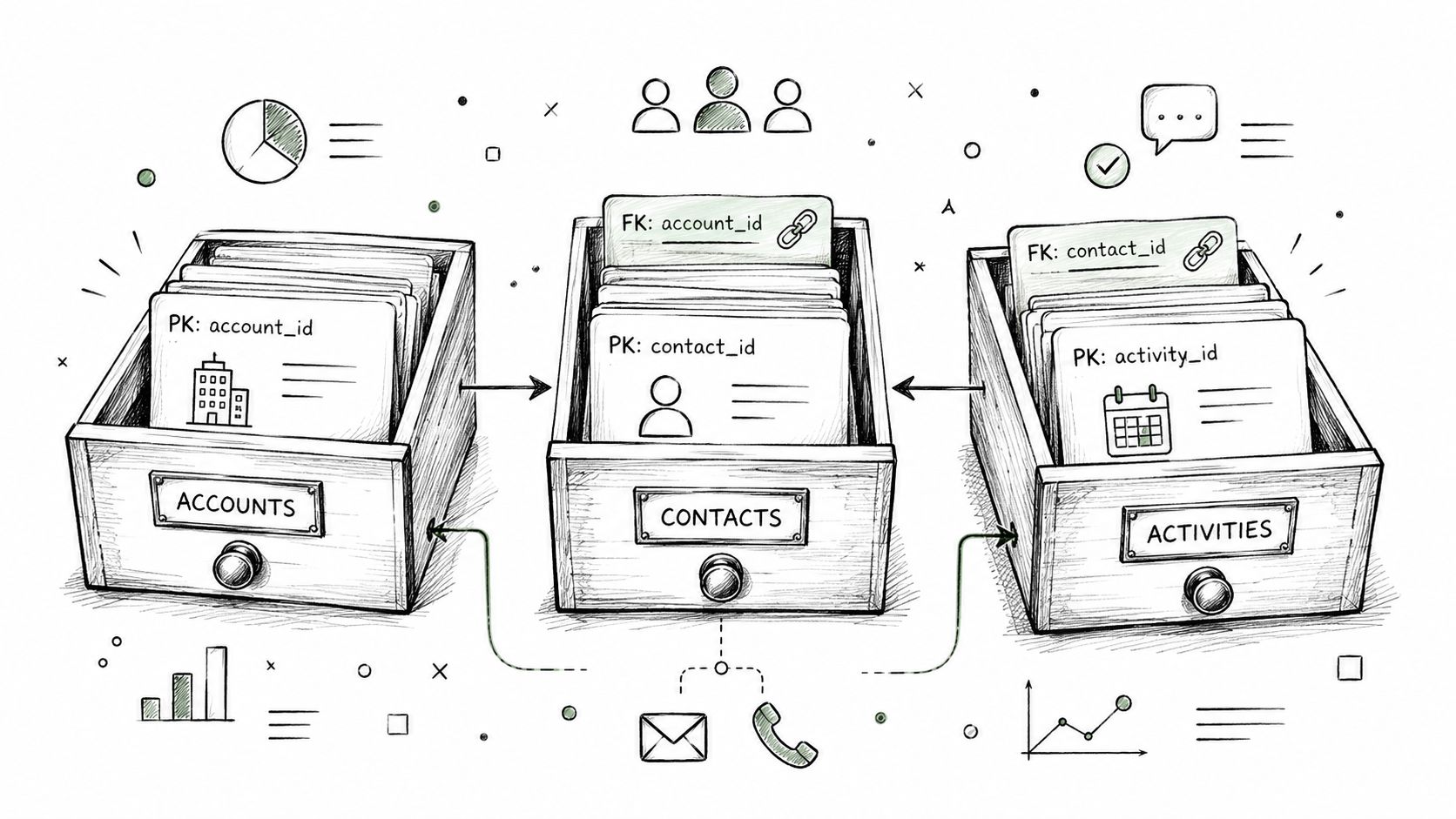
A contact schema should be boring. That is a feature. It keeps accounts, contacts, and activities separate, then ties them together with stable IDs so the same company does not mutate into three different records the moment it enters your CRM, enrichment tool, or reporting layer as outlined in CRM schema guidance.
Think library card, not junk drawer
A library card points to the book and the borrower, but it is not either one. Accounts hold the company record, contacts hold the person record, and activities hold the interaction trail. Primary keys and foreign keys keep those records linked so the schema holds up when you sync data across systems.
If you skip that separation, the problems show up fast. Contacts without accounts make territory reporting fuzzy. Accounts without activities strip away context for scoring and routing. Missing unique IDs turn deduplication into manual cleanup, and manual cleanup burns time every time the dataset grows.
What belongs in the minimum viable schema
Start with unique IDs, timestamps, and sync history. That is the baseline for keeping relationship data intact as records move through import, matching, and refresh cycles, as outlined in CRM schema guidance. You do not need a field museum. You need a structure that keeps identity stable and makes later matching possible.
Keep the schema small, but always include unique IDs. Add fields only when they serve routing, reporting, or deduplication. A bloated schema slows teams down, while a thin but disciplined one stays usable.
A useful test is simple. If one restaurant is both an account and a contact because the owner-operator is also the decision-maker, the schema should store that reality without forcing a fake choice. Real businesses do not arrive pre-normalized, so the database has to handle messy ownership and messy buying structures without breaking.
MapLeads' business documentation shows one way to organize business records around reusable entities instead of throwing exports into a flat pile.
The Four Stages of a Contact Data Pipeline
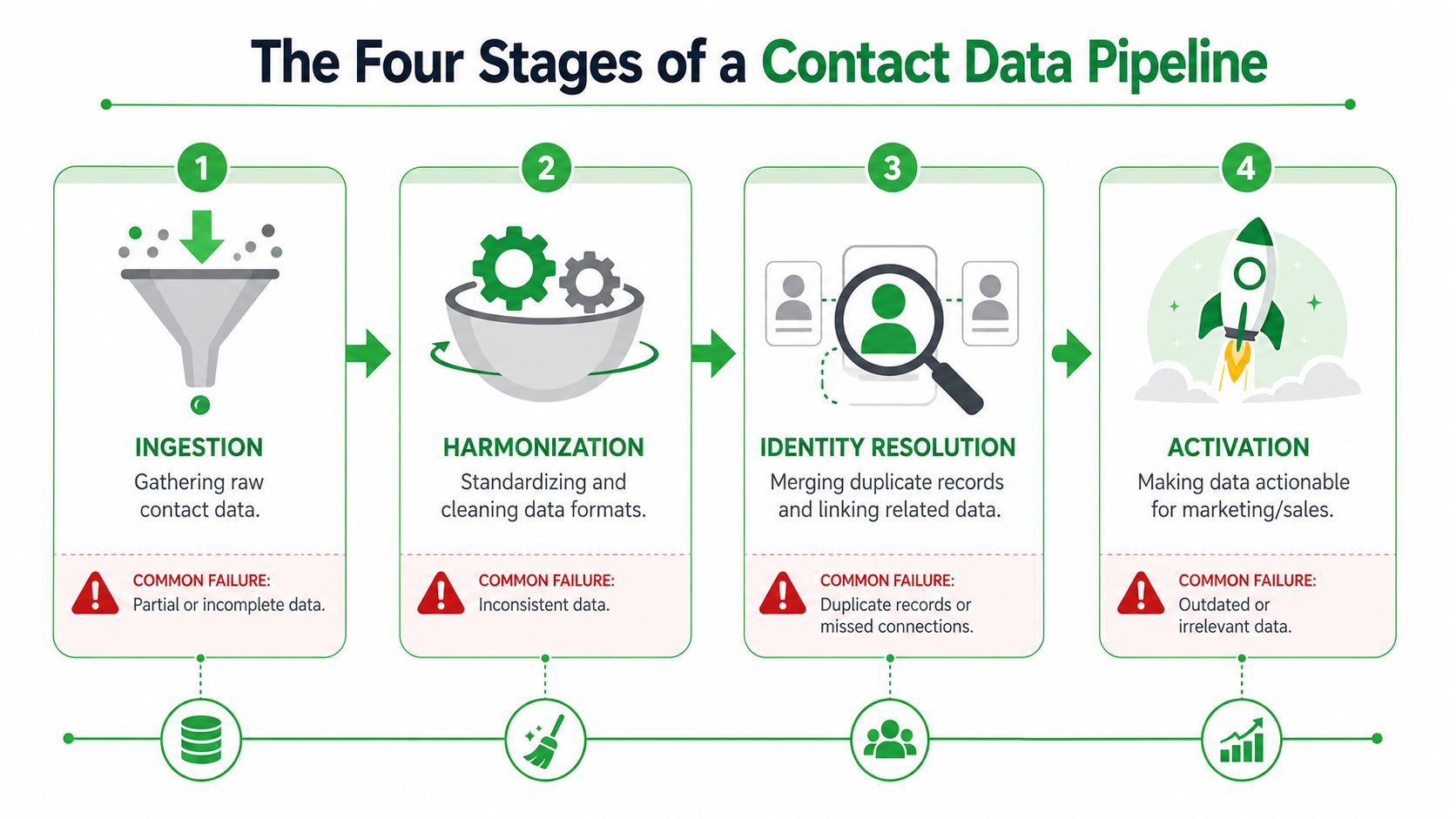
A contact database breaks in stages, not all at once. Ingestion, harmonization, identity resolution, and activation each have their own failure mode, and every handoff is a place for records to corrupt. That's why “just buy a list” usually collapses after the first CRM import.
Ingestion and harmonization are where bad inputs spread
Ingestion fails when exports arrive half-populated or wrapped in unstructured columns. If a source can't give you clean rows on the way in, the rest of the pipeline is already under pressure. That's the first place I look when a team complains that “the data looked fine in the vendor UI.”
{% youtube id="6kEGUCrBEU0" /%}
Harmonization fails when category labels, company names, or role fields don't share a standard. One source says “VP Sales,” another says “VP, Sales,” and a third collapses both into a generic leadership bucket. That sounds small until routing, segmentation, and reporting all start disagreeing with each other.
Identity resolution and activation are where duplicate pain shows up
Identity resolution is the merge step. The same business might appear as three different rows, and your team has to decide whether they're looking at one company, one office, or three separate entities. In enterprise CDP and CRM architectures, deterministic and probabilistic matching use PII signals such as email, phone, and device IDs to create a persistent unified ID as explained in CDP architecture guidance.
Activation is the last mile. If CRM field names don't match, or if the destination system can't accept the schema cleanly, the record is technically present and operationally useless. A vendor can sell you the data, but your team still owns the handoff.
For sourcing discipline, Captapi's guide on identifying quality data sources is worth reading because it forces the question many skip, which is whether the upstream source can survive downstream use.
If one stage is sloppy, the whole pipeline pays for it. The fix isn't more volume. The fix is better handoffs.
Fields That Move the Needle Versus Fields That Just Take Up Space
Most vendors lead with the wrong fields. They spotlight whatever sounds impressive on a landing page, then bury the fields that change reply rates and routing accuracy. I'd rather have a smaller dataset with the right contact mechanics than a bloated one full of decorative enrichment.
| Tier | Example Fields | Why It Matters |
|---|---|---|
| Essentials | Verified email, direct line, job title, job level, company name, account ID, location, domain | These fields support outreach, routing, and deduplication. If these are weak, everything downstream gets shaky. |
| Enrichment signals | Company size, revenue estimate, industry, technology stack, department, seniority band | Useful for segmentation and prioritization, but they're not a substitute for reachable contact data. |
| Vanity fields | Extra descriptors that look nice in a demo but don't change who gets contacted or how they're routed | These usually add noise. They make the schema feel rich without making the pipeline better. |
Require the fields that support action
The first tier is the one you should refuse to compromise on. Verified email and direct line matter because they make outreach possible. Job level and job title matter because they help you avoid sending the right message to the wrong person. Company name, account ID, and location matter because routing and deduplication depend on them.
The second tier is still useful. Revenue estimate and employee count can help with segmentation, account scoring, and territory planning. They just don't deserve the same priority as reachable contact data. Too many teams buy for the second tier and discover too late that the first tier is weak.
What to insist on in the contract or schema
- Verified delivery fields: require the fields your SDRs can use in outreach.
- Stable identifiers: insist on unique IDs for both contacts and accounts.
- Role clarity: make job title and job level explicit, not inferred.
- Location precision: don't accept vague geography if territory rules matter.
- Sync-ready formatting: the export has to match your CRM field names without manual cleanup.
If a vendor can't support those basics, the rest is decoration. A database only earns its keep when a rep can act on it without a cleanup pass.
Measuring Real Coverage Instead of Counting Records
Raw record counts are a vanity metric. They tell you how big a file looks, not whether it covers your target market well enough to use. The better benchmark is verified coverage rate, which compares a vendor's records against official establishment counts and then checks deliverability, using the methodology as described here. That is the number comparison guides usually skip, and it is the one that matters when you are buying a pipeline input, not a list.
Coverage beats bragging rights
If you are evaluating a UK SaaS market with 12,000 establishments, a vendor showing 40,000 records is not automatically stronger than one showing 9,500. The bigger number can mean duplicates, weak geography, or filler that looks good in a demo and adds nothing to outreach. The smaller file can be the better operating choice if it maps more cleanly to the market and produces a higher verified coverage rate, as the Apollo coverage method recommends.
What matters is whether the database reaches the accounts you sell to and the roles that can take action. Buying-group depth, freshness, and provenance matter more than a headline count because they determine whether reps can work the file without extra cleanup.
Regional counts matter more than headline claims
Coverage has to be judged market by market. In the analysis by CleanList, coverage varied from 96% in the U.S. to 88% in APAC. That spread is enough to break a global rollout if you assume the homepage number applies everywhere.
CleanList also used a 500-lead test and weighted results by deliverable email rate, bounce rate, phone coverage, and data freshness within 90 days in the analysis by CleanList. That is the right way to judge a business contact database. Score what your team will use in production, not what sounds broad on a pricing page.
MapLeads' search documentation shows the same practical point from a different angle. Search coverage changes when you compare sources and standardize how results are pulled, so the question is not how many rows a vendor can show, but how defensible those rows are.
A vendor should not win because it has the most rows. It should win because it covers the market you care about with enough verified reach to justify the spend.
Buy Versus Build How to Make the Call
This decision is criteria-driven, not ideological. I've watched teams spend months building a custom pipeline because they didn't want to pay a vendor, then absorb the hidden maintenance cost anyway. If you want a clean comparison, score five things and ignore the sales theater.
Use these five tests
| Criterion | Favors Buy | Favors Build | Depends |
|---|---|---|---|
| Data freshness SLA | Vendor commits to ongoing verification and updates | You already have a reliable refresh process and staff to maintain it | If your market churn is low |
| Regional depth | You need multi-country coverage fast | You only care about a narrow, stable geography | If the rollout is local first |
| Integration surface area | You want CRM and workflow sync out of the box | You have a strong internal engineering team and a stable data model | If your stack is already custom |
| Compliance posture | You need a clearer operational framework and less scraping risk | You can manage source governance, review, and access controls internally | If your legal review is mature |
| Total engineering hours | You'd rather spend engineering time on product than data plumbing | You can staff a permanent maintenance effort | If the pipeline is a core asset |
A 10-person SDR team considering a custom Google Maps pipeline usually underestimates the ugly parts. Proxy rotation, CAPTCHA handling, schema drift across sources, and ongoing verification don't show up in the pitch deck, but they show up in production. A managed alternative absorbs those chores, which is the whole point of buying instead of building.
A build makes sense only when the pipeline is strategic
If your contact data process is central to your product, a build can be rational. If it's just supporting outbound, route the work elsewhere. That's why a commercial option like MapLeads' ZoomInfo alternative guide matters as a reference point, because it shows the trade-off between owning the workflow and paying for an integrated one.
The honest rule is this. Build when data operations are a core competency and a permanent advantage. Buy when you need reliable output more than you need infrastructure bragging rights.
Three Buying Signals Worth Paying For
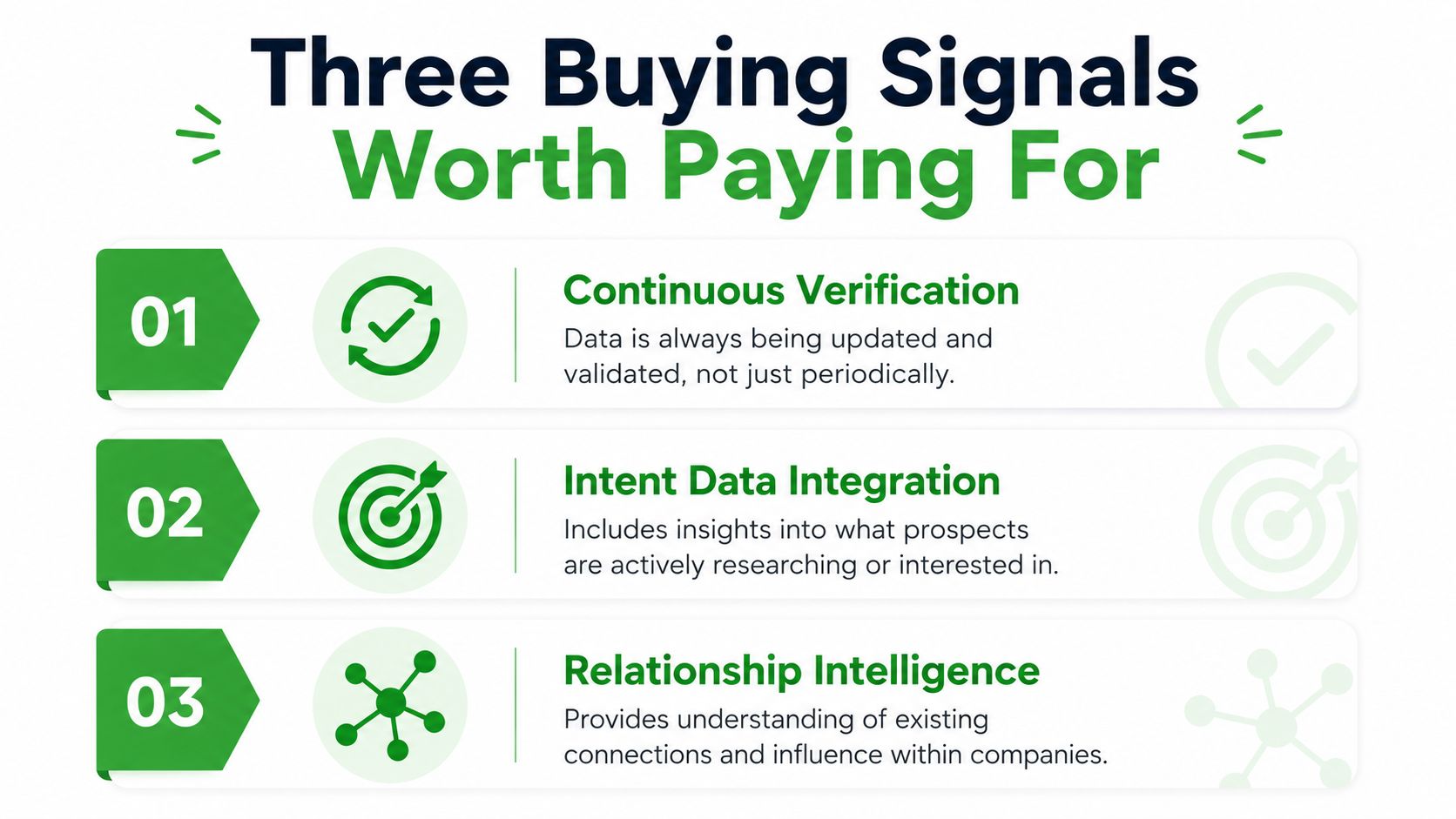
The database is worth paying for when it behaves like a managed pipeline, not a dump of rows. The first signal is continuous verification, because stale data is the root problem behind decay, bounce risk, and broken routing. The second is a standardized multi-source schema that survives CRM migration without a hand-built cleanup project. The third is credit accounting that refunds failed runs instead of punishing careful targeting, because a vendor that keeps your credits on an undersupplied search is charging you for bad coverage.
Use the signals to pressure-test any shortlist
- Continuous Verification: ask how the vendor updates records after collection, not just before export.
- Standardized Schema: ask whether the same fields behave consistently across sources and imports.
- Refunded Failures: ask how failed or undersupplied runs are handled in credits or billing.
That's the shortlist I'd use in a vendor review doc. If a provider can't answer those three cleanly, the subscription will look cheaper than the cleanup that follows.
Tri-source coverage across Google, Apple, and Bing Maps should be standard in 2026, not a premium feature. Teams need broader source coverage, stable output, and fewer schema surprises. If a database can't deliver that, it's not ready for serious outbound.
If you're evaluating a business contact database right now, stop comparing record counts and start testing pipeline quality. MapLeads helps teams pull public business data from Google Maps, Apple Maps, and Bing Maps into exportable lead lists with verified emails, standardized fields, and CRM-ready output. Visit MapLeads if you want to compare coverage, freshness, and workflow fit against your current stack.