Business Directory Scraper: A Guide to Data Extraction
Learn how a business directory scraper works, what data to capture, and how to handle normalization and de-duplication. Your complete guide for 2026.
You're probably staring at a spreadsheet full of copied business names, phone numbers, and half-finished notes, and wondering why a task that should be simple keeps eating your day. Sales reps, marketing ops, and agency teams run into the same wall when they pull local business data by hand from maps and directories, one profile at a time. A business directory scraper replaces that grind with a repeatable workflow that collects public business records, structures them, and keeps them usable after export.
Moving Beyond Manual Data Entry
Manual copy-paste work breaks down fast once your team needs more than a few dozen records. One rep types “Suite” while another types “Ste.”. One source lists a phone number with spaces, another uses parentheses, and a third has the same business under a slightly different name. By the time the list reaches your CRM, the data already looks inconsistent.
A business directory scraper changes that by pulling structured business information from online directories automatically. Instead of a person opening every profile and typing fields into a sheet, the scraper collects public records in a consistent format and sends them to a spreadsheet or downstream system. That matters because directory data is no longer just a static contact list, it's a live ecosystem of business details that changes over time, and industry guidance now treats freshness as the key advantage over old snapshot-style lists. In one India-focused index, Google Maps contained 42,501,900 listings, with 4,503,482 websites and 2,573,094 exposed emails, which shows the scale of data now available for automated collection and enrichment data on live map ecosystems.
For marketing ops, the value is practical. You get cleaner lead inputs, less repetitive work, and a path to broader coverage across categories and cities. For sales, the benefit is even simpler, fewer hours wasted building lists and more time contacting prospects.
Practical rule: if a process starts with “copy this profile into a sheet,” it's already a candidate for automation.
A managed workflow can also reduce the hidden overhead around exports, formatting, and retries. If you're comparing approaches, MapLeads Google Maps Scraper is one example of a tool built around that kind of directory-to-dataset workflow.
What Is a Business Directory Scraper
A business directory scraper is software that reads public directory pages, pulls out the fields your team needs, and turns them into structured records. In practice, it handles three jobs in sequence. It locates relevant listings, collects the visible data from each profile, and organizes the results into rows that can be exported into a spreadsheet, CRM, or marketing system.
How the workflow works
First, the scraper identifies the listings you want. That usually means searching by category, geography, or both, then narrowing the results to candidate business profiles. For a marketing ops team, this is like replacing a stack of scattered profile tabs with one repeatable intake process. The goal is not just volume, it is consistency.
Next, it collects the public fields on each listing. Those fields can include the business name, phone number, website, ratings, and operating hours, along with other visible details that matter for downstream use. The scraper has to read the page the way a person would, but with stricter rules about which text belongs to which field.
Then it organizes the output into a format your systems can use, such as CSV, Excel, or JSON. That step matters because raw page content is hard to trust and harder to reuse. A clean export is what lets a lead list move into a CRM or a workflow without manual retyping.
A good example of this workflow is shown in the business directory scraper documentation, which presents the collection process in a product-oriented way.
Where the value comes from
The value is not only speed. It is the shift from ad hoc copying to a repeatable data pipeline. Once the workflow is defined, the same process can be applied across categories and cities without asking someone to re-enter each record by hand.
That also makes the limits of DIY tools easier to see. Basic guides often stop at extraction, but the more substantial work starts after the records are collected. Duplicate listings, inconsistent field formats, and stale entries can all make a dataset harder to trust if they are not handled with care. A managed workflow built around tools like MapLeads Google Maps Scraper is designed to reduce that friction by keeping the output organized from the start.
A scraper is only useful when the result is structured enough for the next system to accept it.
Key Data Fields You Can Extract
A business directory scraper starts with Name, address, and phone, but that is only the first layer of the record. A listing often carries business identity, geography, reputation, and operating details in one place, so the scraper should treat it as a multi-entity record rather than a flat contact row structured listing fields.
What each field does for the business
Latitude and longitude support territory planning, deduplication, and route logic. If two entries point to the same coordinates but the business name is spelled a little differently, the record may need to be merged. Ratings and review counts serve a different purpose, they help sales and marketing decide which prospects deserve attention first, because public reputation often changes how a team should approach outreach.
Weekly hours, categories, map identifiers, and service attributes fill in the rest of the picture. Hours help teams avoid outreach at the wrong time. Categories support segmentation. Identifiers make it easier to match records across sources, especially when one directory writes the business name one way and another source writes it differently. Exporting these fields as CSV, Excel, or JSON turns them into something a CRM can ingest instead of leaving them trapped in raw page output.
Business impact: the more complete the record, the less your team has to infer later.
A practical schema reference helps here, and the business records field guide shows how these fields are usually grouped for downstream use.
| Data Field | Example | Primary Business Use Case |
|---|---|---|
| Name | ABC Plumbing | Lead identification and matching |
| Full address | 123 Main St, Chicago, IL | Territory targeting and routing |
| Phone | Main business line | Direct outreach and verification |
| Website | company site | Research and enrichment |
| Latitude and longitude | Map coordinates | Location analysis and deduplication |
| Categories | HVAC, contractor | Segmentation and ICP filtering |
| Weekly hours | Open weekdays | Outreach timing |
| Ratings | Star rating | Lead prioritization |
| Review counts | Public review total | Reputation screening |
| Map identifiers | Listing ID | Cross-directory matching |
A careful data model keeps all of this usable without forcing your team to dig through raw notes. That is the difference between a list and a lead database.
The Real Challenge Data Cleaning and Normalization
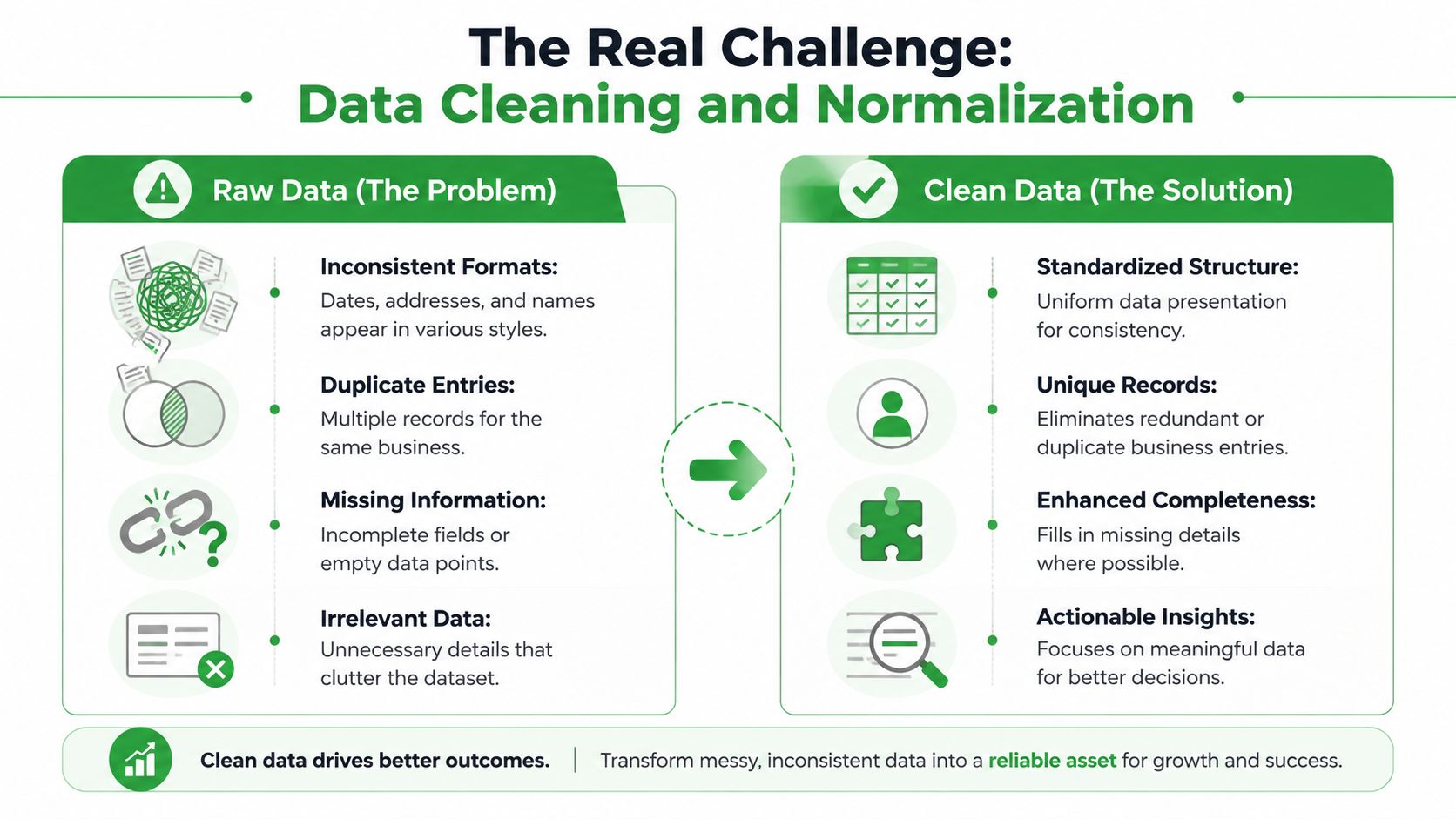
Scraping is the easy part to talk about and the hard part to operationalize. Raw listings look complete until you try to load them into a CRM, match them across sources, or hand them to a sales rep who expects one company per row. Then the hidden work starts, and that work is de-duplication and normalization.
Why raw data breaks down
Different directories describe the same business in different ways. One source might write the address as “Street,” another as “St.,” and a third may split the same information across multiple fields. Phone numbers can appear in different formats, categories can drift, and business names can include extra location text or marketing copy. If you don't normalize those records, your team sees duplicates, messy imports, and inconsistent routing.
The main engineering challenge at scale is entity resolution and coverage normalization across different directories. A common workflow uses two phases, first harvesting candidate URLs from search pages, then visiting detail pages for full profile fields so the dataset is more complete and standardized for pipeline automation two-phase crawl pattern. That's not a cosmetic improvement. It's what keeps one business from showing up three times under slightly different names.
Why this feels like tidying a messy room
Think of raw directory output like a room where every folder got dumped on the floor. You can see the contents, but you can't trust the order. Normalization is the process of putting each item in the right place, while deduplication is removing the repeated copies that waste space and confuse the next person who walks in.
The practical goal is simple. You want one row per real business, consistent field names, and data formatted so the CRM doesn't reject it. When teams skip this work, they don't just get messy spreadsheets, they get bad routing, duplicate outreach, and broken reporting.
What cleaned output should look like
Clean data should feel boring. That's a compliment. The columns stay in the same order, the values use the same format, and the record count reflects real businesses rather than repeated listings. Once that's true, your downstream tools can finally do their job.
If you're evaluating tools, the difference between a basic scraper and a managed workflow shows up here. Basic guides usually stop at extraction. The harder part is making sure records survive contact with your CRM, your enrichment process, and your analytics stack.
Beyond the Directory Enriching Your Data
A directory listing tells you who the business is. It often doesn't tell you what the business sells, how it describes its services, or what coverage area it works in. That gap matters because the words on a map listing are usually thinner than the language on the company's own website.

Why website scraping adds context
Practical directory scraping often requires a deeper enrichment layer because Maps data misses actual services, terminology, and coverage areas that live on individual business websites website enrichment workflow. That means a second pass over the business site can surface service descriptions, specialties, and regional coverage that a map profile doesn't capture cleanly. For marketing ops, that information helps segment leads more accurately. For sales, it helps avoid generic outreach that sounds like it was built from a directory template.
This is also where verified contact details become valuable. A listing may include a website, but not a usable email address. If your goal is a lead database, the directory record is just the starting point, not the finish line. The better question is whether the business can be identified, qualified, and reached with enough context to make the next touch relevant.
How enrichment changes the quality of the list
Enrichment turns a business row into a usable account record. Instead of just “plumber in Dallas,” you can add service language, coverage area, and digital footprint. That gives your team more angles for personalization and better filters for routing. It also reduces the number of leads that look valid on paper but are weak in practice.
Some teams handle this manually. Others use a managed workflow that combines directory extraction, site enrichment, and export in one pass. MapLeads is one example of a cloud-based service in this category, since it collects public business details from Google Maps, Apple Maps, and Bing Maps and adds standardized output fields for downstream use.
Good enrichment makes the record more specific, not just longer.
If you're building a prospecting database, that specificity is what makes the difference between a broad list and a list your team can work.
Keeping Data Fresh The Problem of Data Decay
A directory export feels finished the day it lands in your inbox. A week later, parts of it may already be wrong. Business hours change, categories shift, contact details move, and listings that looked stable at export time can drift away from reality. That's data decay, and it's the reason one-time scraping rarely holds up for long.
Why freshness matters more than extraction
Public guidance on directory scraping recommends keeping a scraped_at timestamp and re-crawling on a schedule so you can compare new records against old ones freshness and recrawling guidance. That sounds operational, because it is. The actual job isn't just collecting listings once, it's keeping them trustworthy enough for CRM import, outreach, and competitor tracking.
If you don't track freshness, your team ends up emailing old addresses, calling numbers that no longer work, or ranking leads using outdated profile data. That creates quiet waste. The list still exists, but its value keeps shrinking.
What a maintenance routine should include
A durable workflow needs three habits. First, store the time of extraction with each record. Second, recrawl on a schedule that matches how often the data tends to change. Third, diff new records against previous exports so you know what changed instead of replacing everything blindly.
That sounds like a lot of moving parts, and it is. It's also why many teams lean toward managed cloud workflows rather than stitching together a local scraper, a scheduler, and a cleanup script. A maintained pipeline is easier to trust than a one-off export that nobody revisits.
If your team wants a repeatable way to run and monitor searches, the MapLeads search workflow shows how a managed process can keep extraction and refresh aligned.
Fresh data isn't a nice-to-have in local lead generation. It's the difference between a list that helps your team today and a list that slowly turns into clutter.
If you want a cleaner way to build and maintain local lead lists from public map data, visit MapLeads and see how its cloud-based workflow handles extraction, enrichment, deduplication, and refresh together. It's a practical option if you need structured business data that stays useful after the first export.