What a Verified Email List Really Means in 2026
Learn what a verified email list actually means, how verification works, why it matters for deliverability, and how to build one that performs in 2026.
A verified email list is one that has passed syntax, domain, SMTP, and risk checks, so non-deliverable, disposable, and spam-trap-like addresses are suppressed before you send. That matters because a 2025 quality benchmark found 80.94% of emails were valid and safe to send, while 11.7% were invalid hard bounces and 7.9% were risky addresses, so nearly 1 in 5 addresses (19.6%) could hurt deliverability if you skip verification.
Most sales teams hear “verified” and assume it means “good for outreach.” It doesn't. A verified email list tells you the address can probably receive mail, but it doesn't promise the person is a fit, interested, or still the right contact for the account.
What a Verified Email List Actually Means
A verified email list is not a promise of replies. It's a list of addresses that has gone through checks designed to remove obvious failures before your campaign ever hits send.
What verification proves
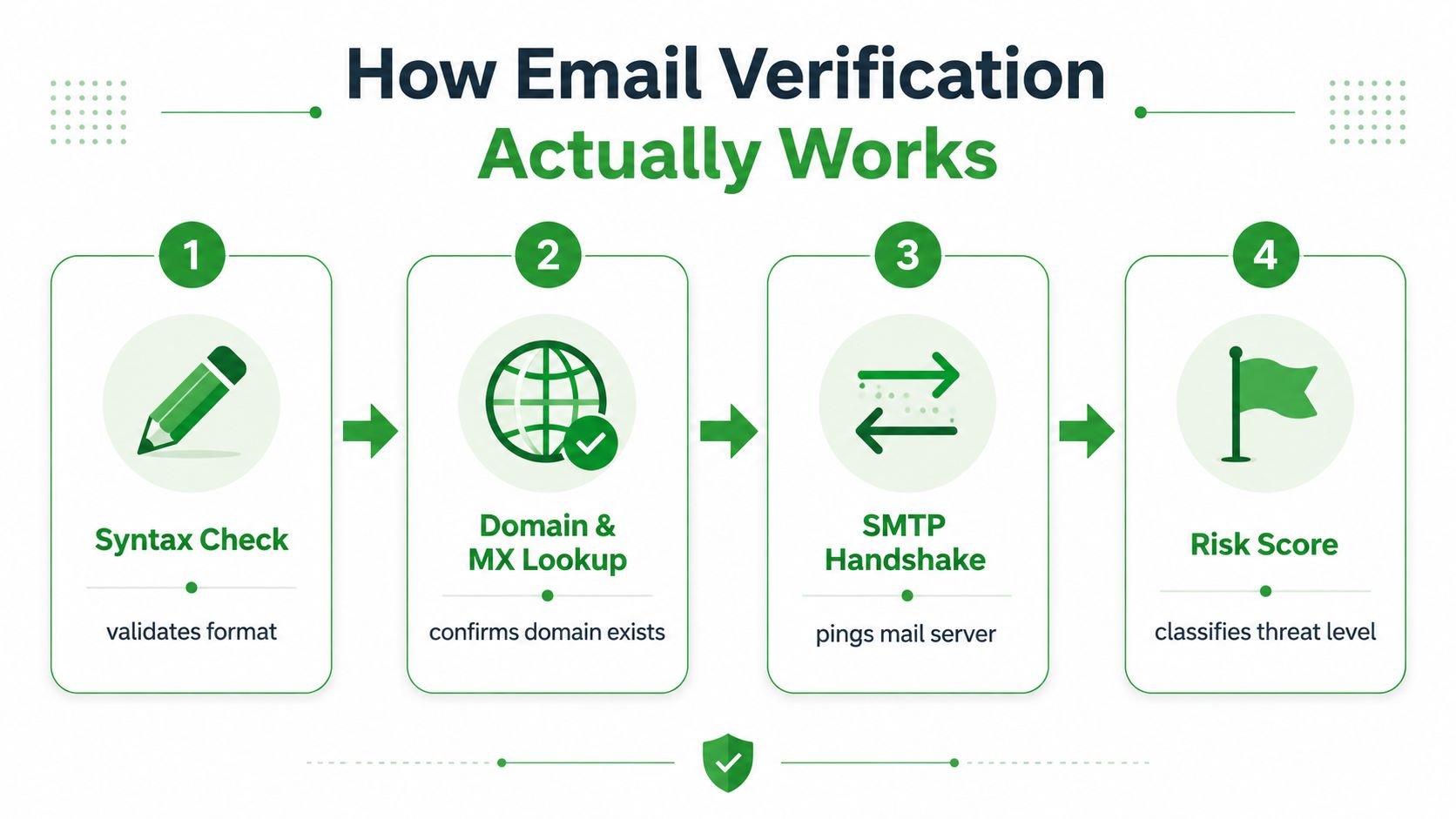
At minimum, verification is a layered quality control process. It starts with syntax checks, then checks whether the domain can receive mail, then tests mailbox reachability at the server level, and finally classifies risky records like disposable, role-based, catch-all, or spam-trap-like addresses. That layered approach is why a production-grade list is different from a spreadsheet that merely looks tidy.
The value is practical. When nearly 1 in 5 addresses (19.6%) in unverified lists can be invalid or risky, even a list that seems “mostly fine” can still create bounce problems and reputation damage if you send it raw, according to the 2025 quality benchmark from SafetyMails.
Practical rule: treat “verified” as a deliverability filter, not a sales guarantee.
What verification does not prove
Verification does not tell you whether the contact is your ideal buyer, whether the role is senior enough, or whether the person still works there. It also doesn't prove the inbox will engage, because engagement depends on timing, relevance, and offer quality, not just mailbox status.
That's the main confusion on sales teams. They buy or build a list, see the word verified, and assume it's campaign-ready. A better mental model is this. Verification answers, “Can I reach this inbox safely?” It does not answer, “Should I send to this person right now?”
A good vendor or internal workflow should suppress non-sendable records before launch. If it doesn't, you're not really working with a verified email list, you're working with an unfiltered database dressed up with better wording.
How Email Verification Actually Works
Think of verification like a bouncer at a venue. First the bouncer checks the ID, then checks whether the building is open, then watches how the guest behaves before letting them in.
The four checks that matter
Syntax validation is the first layer. It catches formatting mistakes, like missing symbols or malformed domains, but it can't tell you whether the mailbox is real.
Domain and MX lookups are the next gate. They confirm the domain exists and is set up to accept mail, which removes obvious dead ends. After that comes the SMTP handshake, where the system talks to the mail server to see whether the specific mailbox responds. Finally, risk classification flags addresses that may exist but still shouldn't be mailed, such as disposable, role-based, catch-all, or spam-trap-like records.
The reason regex-only checks fall short is simple. They only inspect the shape of an address. They don't prove the mailbox will accept your message or that the inbox is safe to contact. That's why production systems rely on API-based verification instead of a formatting test alone, as explained in the verified email list methodology overview.
A mailbox can look real on paper and still be a bad send.
Reading a vendor's claims the right way
If a vendor says “verified,” ask which layers they run. If they only validate format, that's not enough for outbound work. If they run mailbox-level checks and risk scoring, you're closer to a production-safe list.
That distinction matters when you compare tools. For example, a workflow like the one described in the Hunter alternative guide may focus on finding addresses, while your verification layer needs to answer a different question, whether those addresses are reachable and safe enough to mail. Those are related jobs, but they're not the same job.
Once you can separate those layers, you can stop buying “verified” as a label and start evaluating it as a process.
Why List Decay Makes Re-Verification Essential
Verification ages fast. A list that was clean a few weeks ago can drift into risk again as people change jobs, domains expire, and mailboxes go stale.
Freshness is part of the definition
Industry benchmarks cited in 2025–2026 sources put annual B2B list decay at 22%–30%, with one estimate translating that to about 2% per month and roughly 200 unreachable contacts per month in a 10,000-contact database, according to BounceProof's B2B accuracy statistics. A separate guide estimates about 2% monthly decay, which is why re-verification is operational hygiene, not a one-time cleanup, as noted in Valid Email Checker's guidance.
That's why many teams re-check older lists before major sends instead of trusting a file from last quarter. If a list has been sitting in your CRM for months, it's already moving away from the state you paid or worked hard to create.
Operational rule: freshness belongs in the definition of “verified.”
A cadence sales teams can actually use
A practical baseline is to re-verify anything older than 60 days before a meaningful campaign. That window lines up with guidance that points to a two-month refresh cycle, while other outreach workflows use a 90-day hygiene cycle for list re-checks, as summarized in Apollo's verified B2B email address guidance.
| Use Case | Recommended Cadence | Early Re-Check Trigger |
|---|---|---|
| High-volume outbound | Every 60 days | Bounce spike after a send |
| Weekly sales sequences | Every 60 to 90 days | Domain migration notice |
| Monthly nurture lists | Every 90 days | Long dormancy in CRM |
| Purchased or appended data | Before first send | Any sign of stale ownership |
| Dormant lead archives | Before reactivation | No engagement for a long period |
The trigger matters as much as the schedule. Re-check immediately after a domain migration, a bounce spike, or a stretch of dormancy. If the account has gone quiet, the list needs another pass before your team assumes it's still usable.
Verified Does Not Mean Worth Emailing
A verified address can still be the wrong address to contact. That's the part most sales teams miss, and it's where a lot of avoidable pipeline waste starts.
Reachable isn't the same as relevant
Catch-all domains are a good example. They may accept mail broadly, which makes an address appear reachable, but that doesn't mean it's the right person, or that your message will generate a response. Role-based inboxes create a similar problem, because info@, sales@, and support@ are usually shared or routed, not owned by one decision-maker.
Recent guidance separates verification from targeting quality and recommends suppressing catch-all and role-based records when the goal is real outreach performance, not just low bounce counts, as discussed in EDQ's real-world benefits of email verification. That's the right distinction for sales teams. Verification protects your sending reputation. Targeting quality protects your pipeline.
What to suppress after verification
After a list is verified, don't stop there. Add another filter layer for addresses that are technically live but strategically weak.
- Catch-all inboxes: keep these out of aggressive outbound unless you've confirmed the account fit another way.
- Role-based addresses: suppress when your campaign depends on a single person owning the conversation.
- Generic inboxes: treat them as routing points, not high-confidence buyer signals.
- Stale but reachable contacts: remove or downgrade them when job changes or account movement make the contact obsolete.
- Mismatched seniority: don't send executive-level offers to contacts who can't influence the purchase.
The cleanest rule is blunt. A verified email list is only as good as the ICP fit behind each address. If the contact can receive your email but can't use your offer, the list may be technically healthy and commercially weak at the same time.
Three Realistic Ways to Build a Verified Email List
In 2026, teams build verified data in one of three ways. The best choice depends on how much control you need, how much risk you can tolerate, and how strict your audience criteria are.
Buying, scraping, or earning the list
Buying a pre-verified list is the fastest path. It can help teams that need immediate volume, but freshness and consent history depend entirely on the provider's process, so you need to know exactly what was verified and when.
Scraping public sources and verifying in-house gives you more control. It's a better fit when you need tight ICP matching, because you can collect from public business data, enrich the records, and verify before import. A platform like MapLeads email lists fits that model by turning public map data into exportable lead lists with verified emails included in the workflow.
Organic list building is slower, but the consent posture is usually cleaner. Opt-in forms, webinars, partnerships, and content gates create lists that are usually easier to defend from a compliance and engagement standpoint.
Which path fits which team
| Path | Strength | Tradeoff | Best Fit |
|---|---|---|---|
| Buy pre-verified data | Fastest deployment | Least control over freshness | Teams with urgent coverage needs |
| Scrape and verify in-house | Strong ICP control | More operational work | Sales teams with defined target accounts |
| Build opt-in lists | Strongest consent posture | Slower volume growth | Brands focused on long-term nurture |
If your team runs outbound every week, the middle path often makes the most sense. You keep control over sourcing, refresh cadence, and segmentation, while avoiding the black box problem that comes with some ready-made lists.
If your team is demand-gen heavy and mostly works on inbound, the organic path usually fits better. And if you need a temporary list for a narrow campaign, a purchased list can be workable, but only if the provider can explain its verification process clearly and you can handle the compliance burden yourself.
Legal and Compliance Boundaries You Cannot Ignore
Verification helps your emails land. It doesn't give you a legal right to send them.
Deliverability and legality are different questions
That separation matters under GDPR, CAN-SPAM, and CASL. A verified inbox can still be off-limits if you don't have the right basis for contacting that person, the right notice, or the right records. Purchased lists without original opt-in evidence are especially risky, because “deliverable” and “permitted” are not interchangeable.
CAN-SPAM also has operational requirements that sales teams often overlook, like including a physical postal address and honoring opt-outs. GDPR adds a different layer, where lawful basis and documentation matter, especially when you're dealing with personal data rather than general business contacts. CASL is even stricter in some scenarios because consent standards can be more demanding.
A simple do and don't framework
- Do keep records that show where each address came from.
- Do preserve consent evidence when the list is opt-in.
- Do suppress personal addresses that weren't collected for outreach.
- Don't assume verification replaces consent.
- Don't mail scraped personal inboxes as if they were interchangeable with business contacts.
- Don't ignore unsubscribe handling or sender identity requirements.
The practical takeaway is simple. Use verification to reduce bounce risk and clean the database, then use compliance review to decide whether you're allowed to send at all. If those two checks happen in the wrong order, teams end up with a list that performs better technically and worse legally.
Keeping Your List Healthy After the Send
After every campaign, your list should get a quick health check. If you wait until the next quarter, you'll usually find the problems too late.
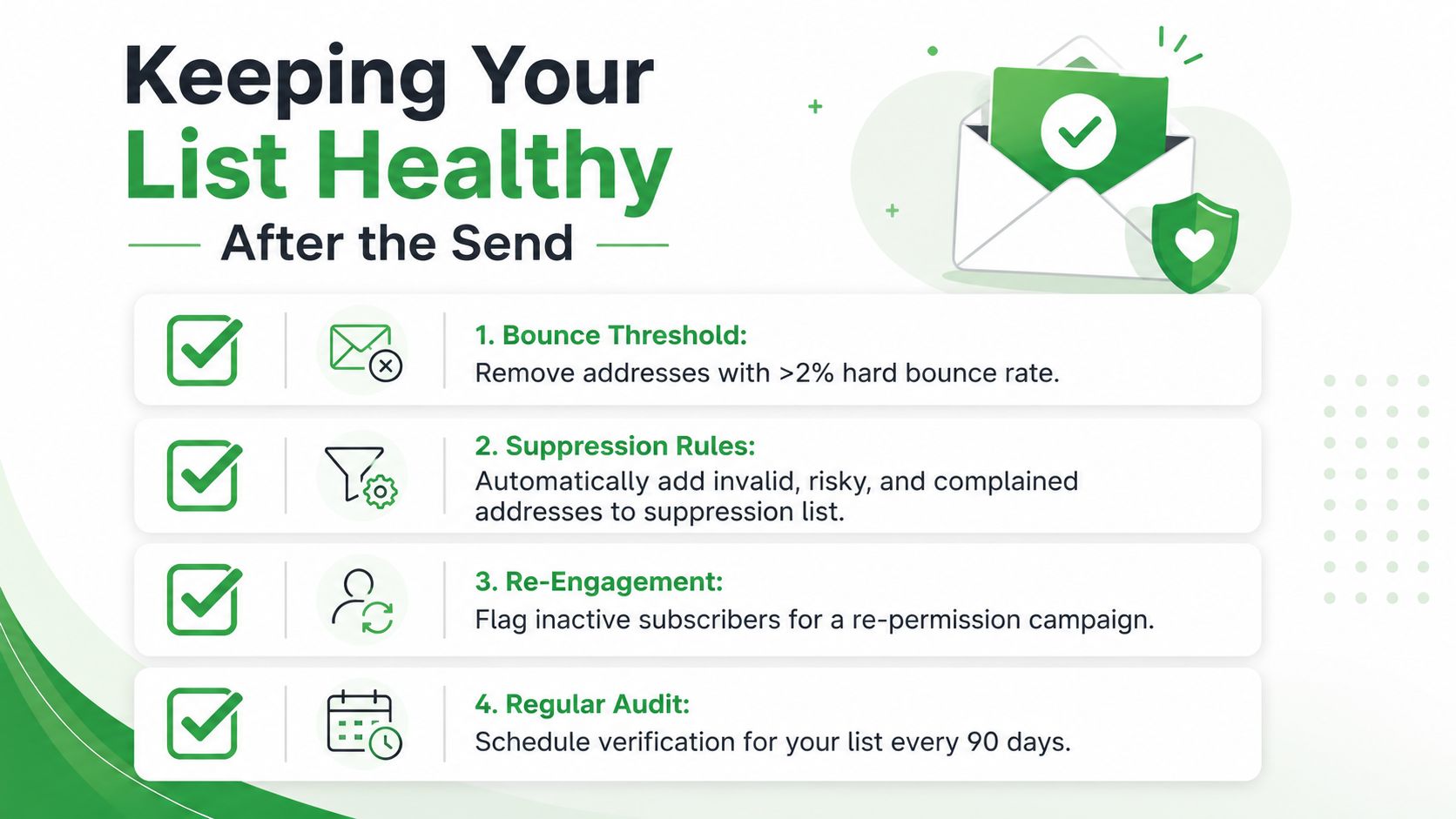
The most useful threshold is still the cleanest one. Keep bounce rates at or below 2% for healthy sending, and treat anything above that as a warning sign that the list, the segment, or the acquisition source needs attention. From there, auto-suppress invalid, risky, and complained addresses, then flag inactive contacts for a re-permission or re-engagement path.
A tight runbook helps a lot. If a list is older than 90 days, re-verify it before the next major send. If bounce behavior changes suddenly, stop, inspect the source segment, and clean before continuing. That's how a verified email list stays useful, not just how it gets purchased once.
A simple video walkthrough can help your team standardize the process.
{% youtube id="cvby9dJnwNg" /%}
For teams that want a workflow built around public business data, enrichment, and verification in one place, MapLeads alternatives to Dropcontact is one reference point for seeing how list building can connect to ongoing hygiene instead of a one-off import.
If you want a verified email list workflow that starts with public business data, adds verification, and keeps your outbound cleaner over time, visit MapLeads and see how it can fit into your sales or lead-gen process. It's a practical way to turn list building into a repeatable hygiene loop instead of a one-time spreadsheet cleanup.