What Is Data Enrichment and Why It Matters in 2026
Learn what is data enrichment, how it improves CRM quality and outreach, common attributes used, and real workflows that turn raw records into pipeline.

Your CRM probably has a familiar pattern. Company names are present, but websites are missing. Contacts have job titles, but no usable email addresses. Phone numbers are outdated, categories are inconsistent, and two records for the same business sit under slightly different names. The sales team still has data, but not enough context to decide who to contact, how to reach them, or where a lead belongs.
That's the practical reason people ask what is data enrichment. They're usually not looking for a technical definition. They want to turn incomplete records into reliable profiles that support fewer bounces, cleaner segmentation, faster routing, and more useful CRM reporting.
The Messy CRM Problem You Already Know
A B2B database can look acceptable when it's first created. Over time, the gaps become harder to ignore. Businesses change websites, employees change roles, phone numbers are replaced, locations move, and categories stop describing what a company does. IBM notes that B2B data can decay by 22.5% to 70% annually, which helps explain why a record that looked dependable during its first campaign may be unreliable later (IBM's explanation of data enrichment).
The symptoms usually appear in daily work:
- Incomplete company records: A business name exists, but the website, industry, location, or relevant category is absent.
- Unusable contact records: A person has a title, but the email address is missing, invalid, or tied to a former employer.
- Inconsistent fields: One record says “healthcare,” another says “medical clinic,” and a third uses a local shorthand nobody can filter consistently.
- Duplicate accounts: The same business entered through different sources creates multiple records, confusing ownership and reporting.
Enrichment addresses this problem by adding relevant, verified context to an existing record. It doesn't replace the CRM entry. It makes that entry more complete and more actionable for the person who has to use it.
Practical rule: Start with the workflow that fails because of missing data. Don't begin by collecting every field a provider can offer.
For sales, that may mean appending a verified work email, direct phone number, company website, and decision-maker details. For marketing, it may mean adding industry, company size, location, or category metadata so a campaign reaches the right segment. For operations, it may mean standardizing addresses, merging duplicates, and mapping source fields to stable CRM properties.
Enrichment also matters outside the database itself. If your team depends on alerts, ownership changes, or follow-up notifications, a cleaner CRM makes connected workflows more dependable. For example, teams managing sales communication may find how to connect HubSpot and Teams useful when they want CRM activity and internal notifications to work from the same underlying records.
The market reflects this shift. The global data enrichment solutions market was estimated at USD 2.37 billion in 2023 and is projected to reach USD 4.58 billion by 2030, at a 10.1% CAGR, according to Grand View Research's market estimate. Enrichment has moved beyond occasional list repair. It now functions as part of the operating layer behind go-to-market data.
What Data Enrichment Actually Means
Data enrichment is the process of adding relevant external or inferred attributes to an existing dataset, while improving the record's completeness, accuracy, and usefulness. The starting record remains important. Enrichment builds on it by appending information that helps a person, system, or model make a better decision.
A simple analogy is a half-filled profile. Data collection creates the profile in the first place. Data cleansing fixes spelling, removes duplicates, and standardizes what's already written. Enrichment is the verification layer that adds useful details, such as a website, contact channel, business category, location attributes, or technology signals.
Three activities that teams confuse
Data collection gathers the initial records. A maps search, form submission, event list, or CRM import may produce a company name and address. Collection answers, “Which records do we have?”
Data cleansing improves the structure and consistency of existing records. It may correct formatting, normalize phone numbers, identify duplicates, or flag invalid values. Cleansing answers, “Can we trust and use the fields already present?”
Data enrichment adds new context from internal or external sources. It may append email addresses, social profiles, industry classifications, revenue bands, opening hours, or behavioral signals. Enrichment answers, “What else do we need to understand, route, segment, or contact this record?”
The distinction matters because adding fields without a reliable match can make a CRM look richer while making it less trustworthy. A pipeline needs a stable identifier, clear source lineage, and a defined rule for deciding whether the new attribute belongs to the correct record. Technical guidance from The DataOps Organization describes enrichment as a transformation step that can join, derive, or annotate existing records while preserving referential integrity and lineage.
A useful one-sentence definition is: Enrichment takes a record you already have and adds verified context that helps your team act on it. If you're building the record from scratch, you're collecting data. If you're correcting the existing values, you're cleansing data. If you're adding new, relevant attributes, you're enriching it.
For a broader practical framework, you can also review this 2026 data enrichment strategy, then adapt the approach to your CRM's actual gaps rather than copying a generic field list.
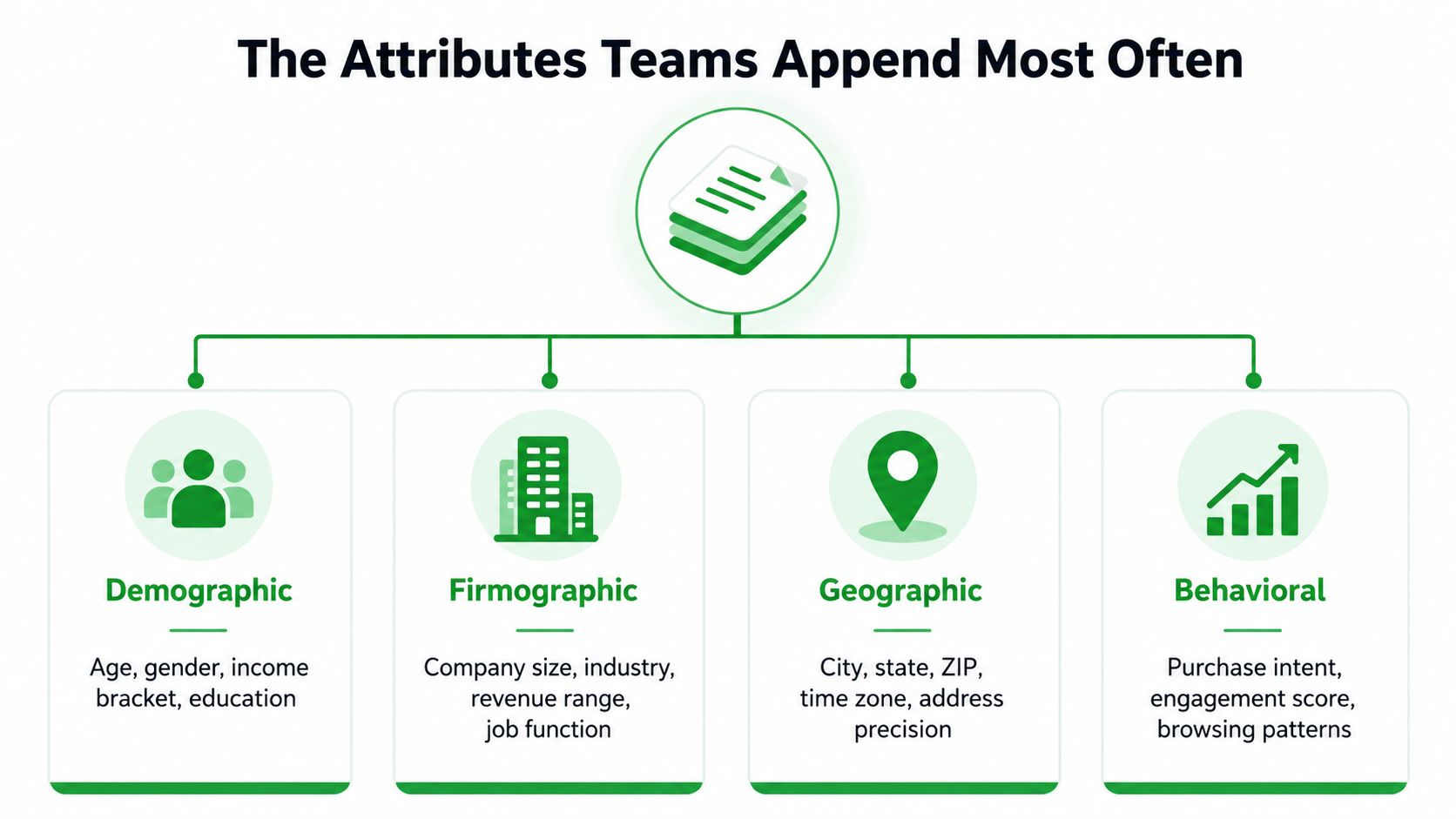
The Attributes Teams Append Most Often
The right enrichment fields depend on the decision your team needs to make. A sales rep may need a reachable contact and a clear account profile. A marketer may need consistent segments. A local operations team may need precise location and opening-hour data. The useful question isn't “Which fields can we add?” It's “Which missing attributes change what we do next?”
Firmographics explain who the account is
Firmographic data describes the organization. Common fields include industry, company size, revenue band, business category, job function, and technology environment. These attributes help a team decide whether an account fits its ideal customer profile, which message should be used, and which representative should own the opportunity.
A company category can also change routing. A “restaurant” record may need a different sales motion from a “food distributor,” even if both appear in a broad food-related search. Standardized classifications make those distinctions usable in filters and reports.
Contactability determines whether outreach can happen
Contactability includes verified email addresses, phone numbers, social profiles, websites, and contact preferences. This family usually has the most immediate effect on outbound execution because it answers the basic operational question, “Can we reach this person or business through a channel we trust?”
A verified email can prevent a campaign from sending to an obviously bad address. A phone number gives a rep another channel when email isn't appropriate or doesn't produce a response. A social profile can help identify the correct person or confirm that a contact still belongs to the account.
Contactability deserves priority over decorative profile data. A long record with no usable channel doesn't give an SDR a practical next step.
Location metadata makes routing more precise
Location fields go beyond a city name. Depending on the use case, teams may append full addresses, coordinates, time zones, opening hours, claimed status, Place IDs, or address precision. These attributes support territory assignment, local campaigns, field sales planning, and location-sensitive service workflows.
A company's time zone can influence outreach timing. Opening hours can determine whether a local business is currently reachable. Coordinates can help separate branches that share a brand name but serve different markets.
If your workflow depends on business listings, MapLeads' business data documentation provides a useful example of the kinds of structured business attributes that can be carried into downstream systems.
Reputation signals help prioritize attention
Ratings, review counts, source URLs, and claimed status provide context about a business listing's visibility and activity. They shouldn't be treated as automatic proof of purchase intent, but they can help sales and marketing teams organize research and define campaign segments.
The field list should stay narrow enough to maintain trust. Append attributes that support a routing, targeting, personalization, qualification, or reporting decision. Leave out fields that create clutter without changing the next action.
A Real Maps-to-CRM Enrichment Workflow
A maps-to-CRM workflow starts with a public business listing and ends with a structured record that a sales or marketing system can use. The important detail is that extraction alone isn't enrichment. The workflow becomes valuable when it adds missing context, checks the result, removes duplicates, and exports fields that map cleanly to the CRM.
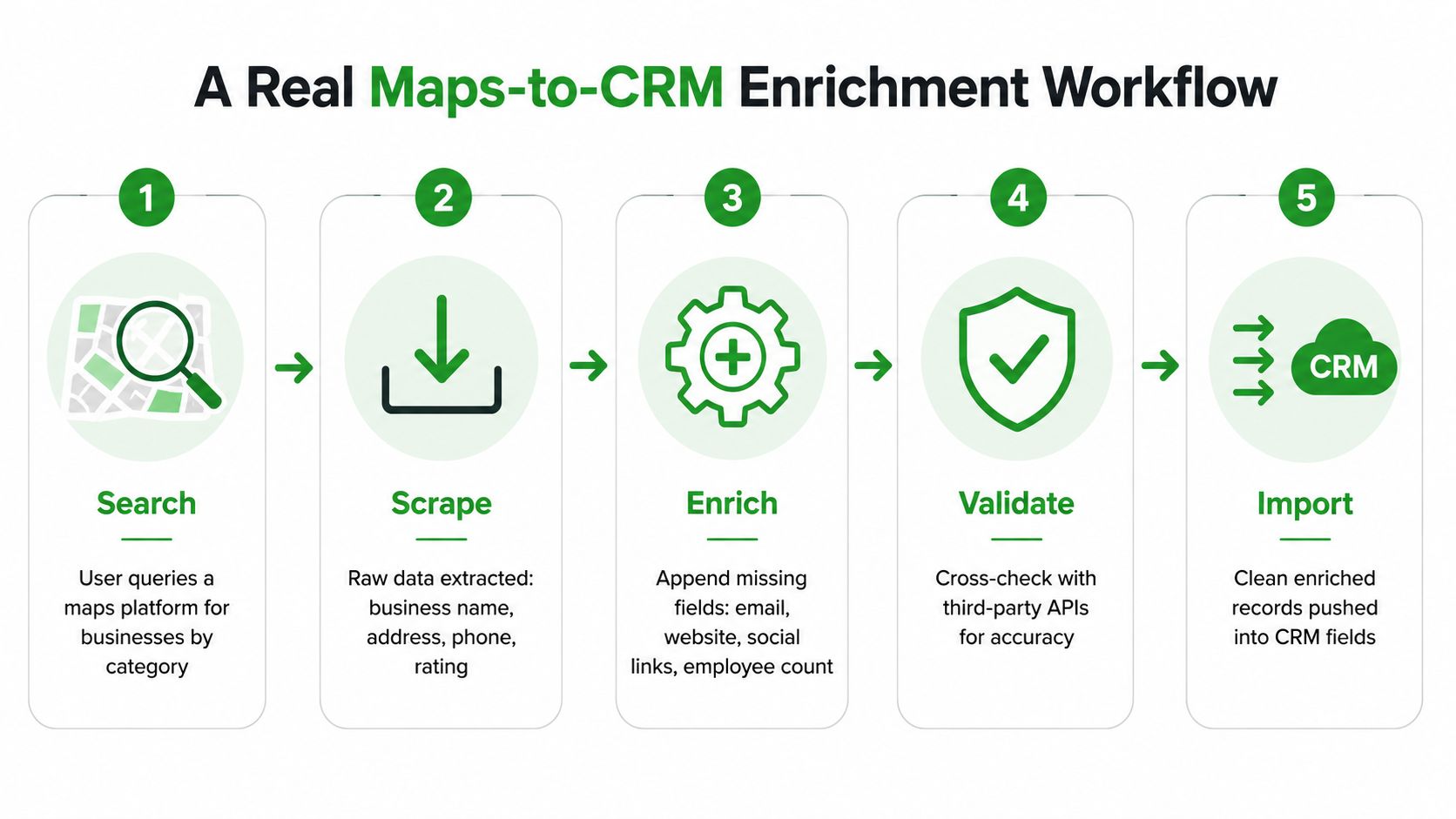
1. Define the search
Start with the business category, geography, and qualification rules. “Accountants in Toronto” is a starting query, not a complete operating specification. Decide whether you need all listings, only a particular service category, specific neighborhoods, or businesses with certain location and reputation attributes.
If you search across countries, keep the schema consistent. Country, region, city, category, and source should remain separate fields so the CRM can filter them without manual cleanup.
2. Extract the public listing data
The extraction stage captures the visible base record. Typical output includes business name, address, phone, website, category, rating, review count, and source URL. A Google Maps workflow can be implemented with a dedicated Google Maps scraper, while other teams may use internal scripts or separate data collection tools.
At this point, the list is useful for discovery but may still contain missing or inconsistent contact details. A business can have a website but no published email, or a phone number that belongs to a central office rather than a local branch.
3. Append the missing attributes
The enrichment stage checks the base record against additional sources and appends fields such as verified emails, social profiles, phones, opening hours, standardized categories, coordinates, and location metadata. Each appended value should remain tied to the correct business identifier.
A unified pipeline can reduce manual handoffs. Instead of exporting from one scraper, uploading to an email finder, copying results into a cleaner, and then rebuilding the CRM import, one workflow can preserve the same record key and column structure throughout.
4. Validate and deduplicate
Validation asks whether the appended value is plausible, current, and associated with the right record. Deduplication handles the same business appearing under different names, sources, locations, or formatting conventions.
Keep source and verification status in the output. Those fields give an operations team a way to investigate questionable records rather than treating every appended value as equally reliable.
5. Import into stable CRM fields
The final export should use predictable columns that map to account, contact, location, and source properties. A clean import preserves ownership rules, prevents duplicate creation, and lets downstream automations use the data without custom fixes.
A strong workflow doesn't merely produce more rows. It produces records that sales can route, marketing can segment, and operations can audit.
Batch Enrichment vs Real-Time Enrichment
The timing of enrichment changes how useful the result is. Batch enrichment updates a defined group of records on a schedule. Real-time enrichment checks and augments a record at the moment an event occurs, such as a form submission, chat conversation, lead-routing event, or CRM update.
Most enrichment still happens in batches, but industry coverage points to growing buyer interest in real-time checks because stale data can weaken conversion speed and routing decisions (BetterEnrich's discussion of data enrichment market trends).
| Dimension | Batch Enrichment | Real-Time Enrichment |
|---|---|---|
| Trigger | Scheduled job, campaign preparation, or database review | Form fill, interaction, inbound lead, or routing event |
| Scope | A segment, list, territory, or full database | One record or a small event-driven group |
| Main strength | Consistent refresh across a known population | Fresh context at the moment a decision is made |
| Typical use | Preparing an outbound list or refreshing account fields | Assigning a lead, personalizing a response, or checking contactability |
| Main risk | Data may become stale between runs | Failed lookups or latency can affect the live workflow |
| Best operating need | Planned coverage and repeatable maintenance | Speed-sensitive qualification and routing |
Batch enrichment fits a team preparing a list for a planned campaign. Operations can define the segment, run the required checks, review exceptions, and load the approved records into the CRM. It's easier to audit because the team can compare the before and after state.
Real-time enrichment fits an inbound lead that needs an immediate decision. A form submission may contain only a name, email, and company. A live lookup can add firmographic context, identify the account, check location, and send the lead to the appropriate owner before a rep responds.
Many teams need a hybrid model. Use scheduled jobs to refresh broad account and contact populations, then use event-driven checks for new leads and high-priority interactions. If your CRM needs to trigger enrichment or downstream actions when a record changes, MapLeads webhook documentation offers a concrete reference for event-based integration design.
Decision rule: Use batch enrichment for coverage, real-time enrichment for speed, and a hybrid cadence when both database health and rapid response matter.
The return comes from matching timing to the business decision. Fresh data has little value if nobody acts on it, while a perfectly scheduled refresh can still fail when a new lead waits in an incomplete routing queue.
How Enrichment Lifts Outreach and CRM Quality
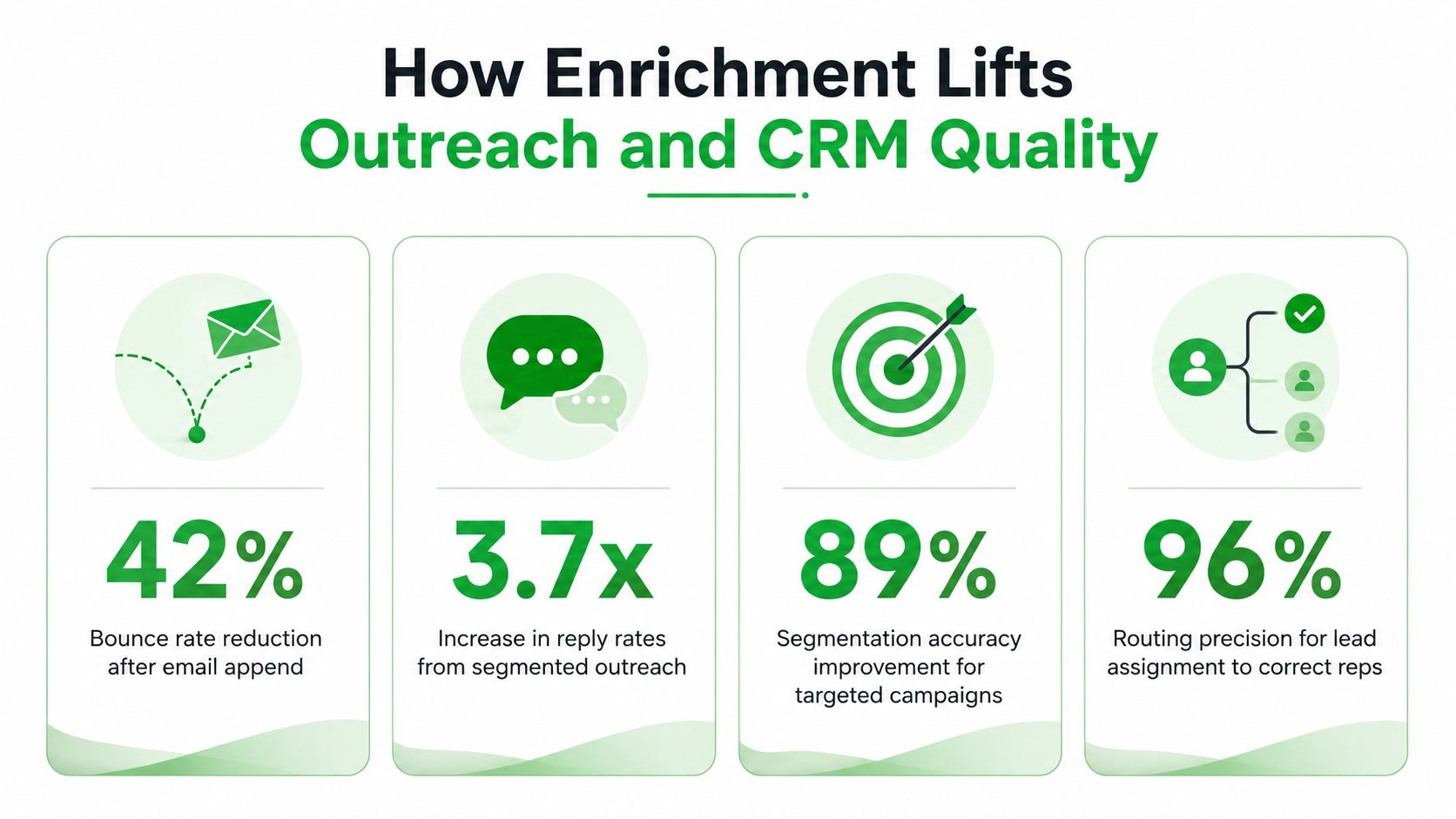
Enrichment improves outreach when each added attribute removes a specific point of friction. A verified email addresses a deliverability problem. A phone number enables another channel. A category or industry field improves segmentation. A location field supports territory assignment. A source URL gives the team a path for review.
Fewer bounces start with contact verification
An email field is not automatically a usable email field. Teams need to distinguish between an address that was copied from an unverified source and one that passed a verification process. Verification can reduce the number of messages sent to invalid destinations, protect campaign hygiene, and give reps greater confidence before they start a sequence.
The outcome isn't a cleaner export. It's fewer dead ends in the outreach workflow. The team spends less time investigating failed sends and more time reviewing the accounts that remain reachable.
Better segmentation requires consistent context
Segmentation depends on fields having shared meaning. If one record uses a broad industry label and another uses a local category, a filter may produce a group that looks precise but isn't operationally consistent.
Firmographics, geographic attributes, business categories, and behavioral signals give marketing teams more ways to define a relevant audience. A location-based campaign can use region and opening hours. An account campaign can combine industry and company profile. A prioritization model can incorporate reputation fields without confusing them with confirmed intent.
Teams building prospecting lists can use MapLeads email lists as one example of an output designed around contactable business records rather than names alone.
Routing improves when records carry ownership clues
Routing rules often depend on location, category, account type, or assigned territory. Missing fields force operations teams to use fallback rules, manual review, or broad assignment. Enriched records give those rules more usable inputs.
Standardized columns also reduce downstream integration work. CRM imports, reporting templates, lead scoring, and analytics pipelines can rely on predictable field names and formats. That benefit compounds because every later workflow starts with a more consistent record.
The impact will vary by data source, audience, verification quality, and process design. Enrichment won't fix weak messaging, poor targeting logic, or slow follow-up by itself. It improves the information available to those processes, which is why the clearest gains usually appear where missing or stale data was blocking execution.
Common Misconceptions That Undermine Enrichment Programs
A fuller CRM record is not automatically a better one. More fields always mean better data is a misleading assumption. An unused field adds clutter, while an unreliable value can weaken confidence in the entire record. For an outbound rep, a reachable contact, a relevant account profile, and a clear next action matter more than a profile packed with unverified attributes.
Enrichment is also not a one-time cleanup project. After an import, employees change roles, companies update websites, locations close, and business categories shift. A record that was accurate during one campaign may misroute a lead later. Refreshes therefore belong in regular CRM maintenance, with timing based on how quickly each field changes.
Another misconception is that appended data is ready for activation. Consider a rep assigned accounts using an inferred category. A business that appears to fit “healthcare” because of its name may sell software to clinics. The rep sends the wrong message, routes the account to the wrong territory, and creates a correction task that better verification could have prevented. An inferred category can support research, but it should not automatically drive segmentation or outreach.
A scraped phone number might reach a shared office. An email address may be outdated or unsuitable for outreach. Each source needs a quality rule, and each field needs a defined job.
What a trustworthy program records
A reliable pipeline should preserve:
- Source context: Where did the value come from?
- Verification state: Was it checked, inferred, or collected?
- Refresh timing: When was it last reviewed?
- Match logic: Why was it attached to this record?
- Usage rules: Can the field support routing, segmentation, outreach, or only research?
Privacy and compliance belong in the design as well. Public availability does not automatically make every use appropriate. Teams should define lawful outreach practices, follow applicable requirements, and keep uncertain data out of aggressive automation.
The strongest programs stay selective. They add fields that improve a real decision, record how those fields were obtained, and remove or quarantine values that no longer meet the team's quality standard.
Starting or Sharpening Your Enrichment Pipeline
You can improve an enrichment pipeline without starting with a full database overhaul. Begin with the failure that costs the team the most time or creates the most risk.
Use this checklist:
- Audit the current gaps: Sample CRM records and identify missing websites, emails, phones, categories, locations, or ownership fields.
- Tie fields to outcomes: Choose attributes that support a campaign, routing rule, scoring model, or reporting requirement.
- Set the cadence: Use batch refreshes for broad coverage and real-time checks for new leads or time-sensitive routing.
- Test a small sample: Compare source quality, match accuracy, duplicate behavior, and CRM mapping before expanding the job.
- Track provenance: Keep source, verification status, and refresh information alongside the appended value.
- Schedule maintenance: Treat enrichment as recurring data operations, not a task that ends after the first import.
For sales teams, the practical starting point is often a focused account list with clear territory and contactability requirements. This sales team enrichment use-case guide can help translate those requirements into a workflow your reps will use.
The goal isn't to create the largest possible profile. It's to create a dependable record that helps someone decide who to contact, how to reach them, where to route them, and what context belongs in the conversation.
MapLeads turns searches from Google Maps, Apple Maps, and Bing Maps into structured business records, then adds fields such as verified emails, phones, websites, social profiles, reviews, and standardized location metadata for CRM-ready export. Visit MapLeads to evaluate whether a maps-to-CRM enrichment workflow fits your prospecting and data-maintenance process.